


7 Proven Ways to Keep Libby Books Longer or Forever
"I don't want my hobby to feel like a job."Many readers face this frustration: when a 28-hour Libby audiobook only has a 7-day loan, finishing it on time feels stressful. Libby automatically returns books on their due date, which can make long ebooks or audiobooks disappear before you’re done. If you’re tired of rushing to finish before the "Loan Expiring" notice or waiting months to re-borrow, it’s time for a better strategy.
Whether you want to keep Libby books longer to fit your busy schedule or keep Libby books forever to read at your own pace, there are several ways to read past the due date without stress.
In this guide, we’ll cover 7 proven ways to extend Libby loans, from official Libby hacks to professional backup solutions. Let’s make reading fun again.
Method 1: Change, Extend & Renew Libby Loans - The Official Way
The simplest and safest way to keep Libby books longer is to use Libby’s official features. Most users stick to the default settings, but you can actually change the hold length on Libby and manage your renewals to maximize your reading window.
How to Change Your Libby Default Loan Period:
Step 1.When you find a book you want, tap Borrow.
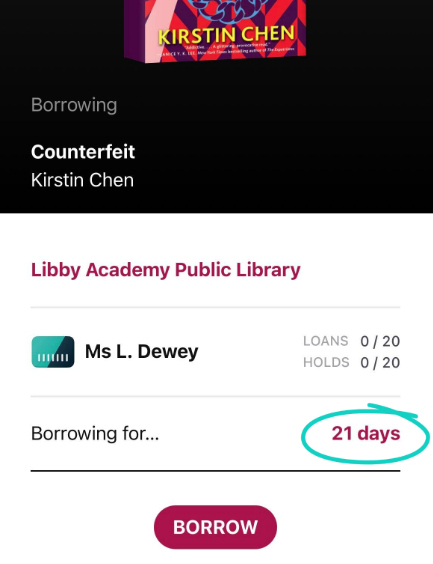
Step 2.On the confirmation screen, tap the underlined loan period (e.g., "7 days").
Step 3.Select a longer period from the list (usually 14 or 21 days, depending on your library’s policy).
How to Renew Your Libby Loan:
Step 1.Go to your Shelf and tap Loans.
Step 2.Tap Manage > Renew Loan.
How to Suspend Your Hold to Manage Your Schedule:
Step 1.If a hold becomes ready but you’re too busy to finish it in time, use the Suspend Hold feature. This keeps your place in line without starting the "loan clock" prematurely.
Step 2.If a hold is ready: Tap Shelf, go to Holds, and tap Suspend.
Step 3.If a hold isn't ready yet: Go to Manage Hold > Suspend Hold.
✅ Pros
- Safe and fully supported by Libby.
- Keeps reading history, bookmarks, and notes intact.
- Works for both ebooks and audiobooks.
❌ Cons
- Renewal may not be available if someone else is waiting.
- Maximum loan periods depend on your library’s rules.
Method 2: Use "Airplane Mode" to Read Libby Books Past the Due Date
If you only need a few extra days (or weeks) to finish a story, the Airplane Mode hack is a classic community favorite.
How to Keep Libby Books Longer on Kindle (Paperwhite, etc.):
Step 1.Borrow the book in Libby and select “Read with Kindle”.
Step 2.Open your Kindle, turn Wi-Fi on, and wait for the book to fully download to your library.
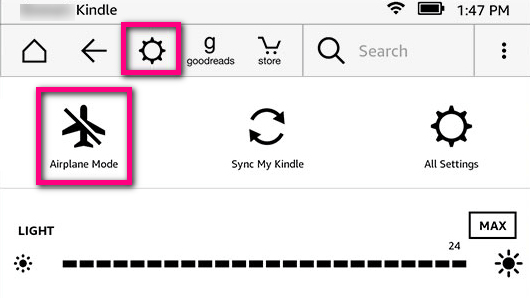
Step 3.Go to Settings and turn on Airplane Mode. Make sure the Wi-Fi icon disappears.
Step 4.On your phone's Libby app, go to Manage Loan > Return Early. This returns the book to the library for the next person, but the file stays on your offline Kindle!
See Also: How to Get Libby on Kindle Paperwhite/Fire Tablet/App
How to Keep Libby Books Longer on iPad:
Step 1.Fully borrow multiple books or audiobooks in the Libby app.
Step 2.Turn on Airplane Mode.
How to Keep Libby Books Longer on Old Phones:
Step 1.The steps are similar to iPad, with one extra trick – change the date:
Step 2.Go to Settings > General > Date & Time.
Step 3.Turn off "Set Automatically".
Step 4.Manually roll the date back by a few weeks or even a year.
Step 5.Open Libby and read as usual. The app will "think" the due date hasn’t arrived yet, giving you extra time to finish your book.
How to Keep Libby Books Longer on Kobo:
Step 1.Turn on Airplane Mode.
Step 2.Open the borrowed book and let Kobo enter sleep mode without exiting the book.
Step 3. Keep the book open; if you exit after the loan ends, you won’t be able to open it again.
See Also: Libby on Kobo: Borrow and Read eBooks from Your Library Easily
✅ Pros
- Gives you extra time to finish Libby ebooks and audiobooks.
- Can borrow multiple books and read at your own pace.
- Saves device battery by disabling Wi-Fi.
❌ Cons
- Borrowed books are still automatically returned; this just delays removal from your device.
- Limits access to online features (sync, dictionaries, Wikipedia).
- May not work on all devices.
Method 3: Download and Keep Libby Ebooks & Audiobooks Forever
Temporary Libby tricks like Airplane Mode or changing the system date may extend a Libby book for a short time, but they lock your device in “offline jail.” You can’t sync, update, or use your device freely, and once you go back online, the Libby book disappears immediately. If you’re looking for a reliable and long-term solution to keep Libby ebooks and audiobooks forever, using a professional Libby converter is the most effective option.
Best Libby Downloader - AnyLibro Converter
AnyLibro Converter is widely recognized as one of the best tools for downloading and converting Libby ebooks and audiobooks. It allows you to remove borrowing restrictions and save your library loans as permanent files for personal use. With AnyLibro Converter, you can:
AnyLibro Converter
How to Keep Libby Books Permanently (Step-by-Step)
Step 1.Open AnyLibro Converter on your PC or Mac and log in with your library card. The software will automatically detect all your borrowed Libby ebooks and audiobooks from the cloud.
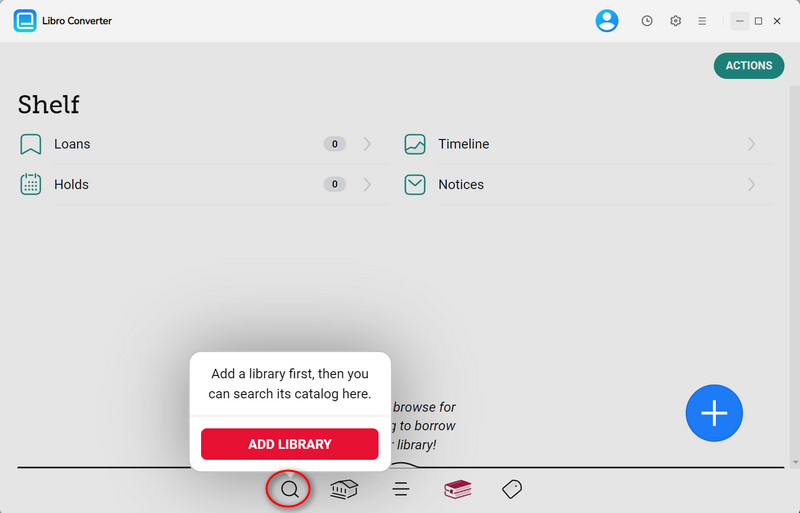
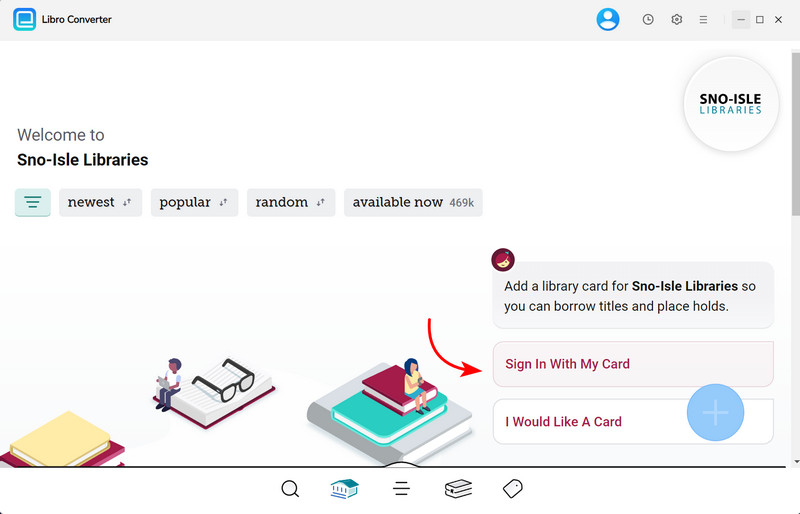
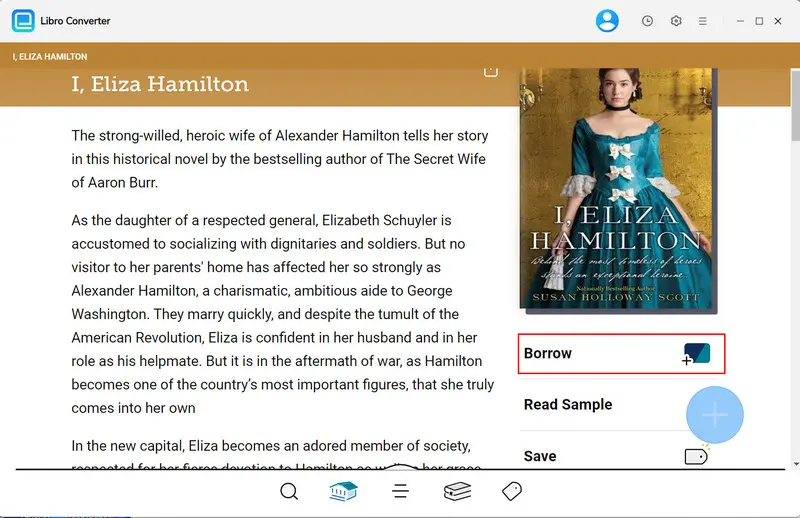
Step 2.Use the built-in search to find the Libby books you want to keep permanently. Just like in the Libby app, add them to your loan list inside AnyLibro
If you hit your Libby loan limit, return an older title first to free up space for the books you really want to save.
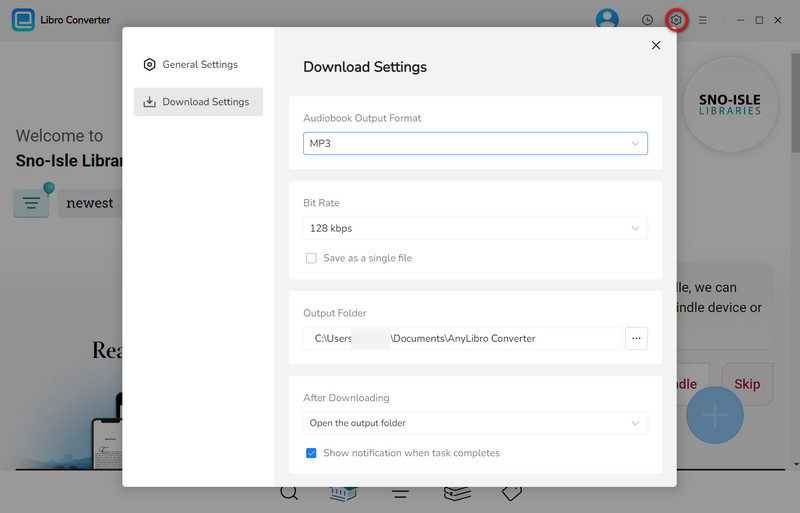
Step 3.Click the Gear icon to open Settings:
For Libby audiobooks, choose MP3 or M4B.
For Libby ebooks, select EPUB.
You can also adjust the bit rate, output folder, and other options to ensure high-quality downloads.
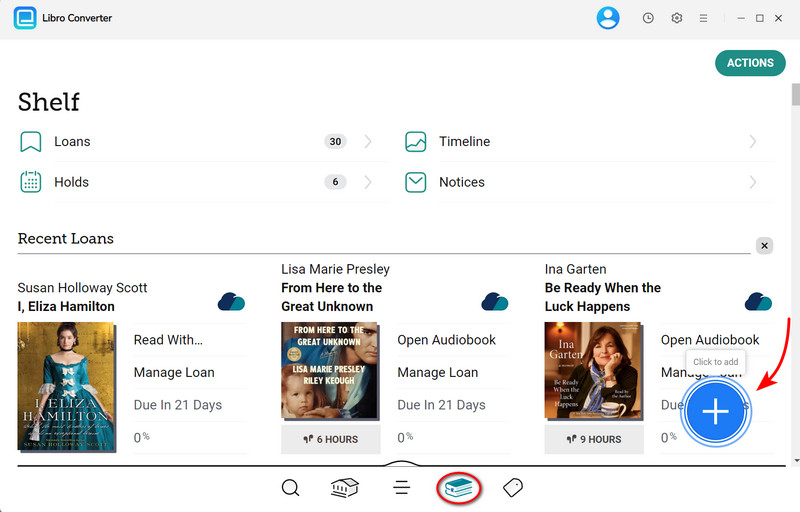
Step 4.Go to Shelf by clicking the book icon. Click the floating “+”button in the lower-right corner. AnyLibro Converter will analyze your Libby loans and load them automatically.
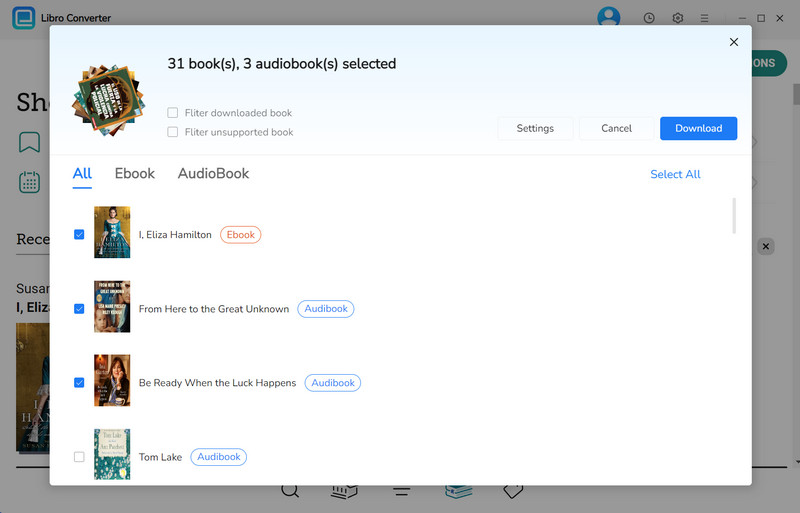
Step 5. Click the Download button to convert Libby books into MP3 or EPUB files.
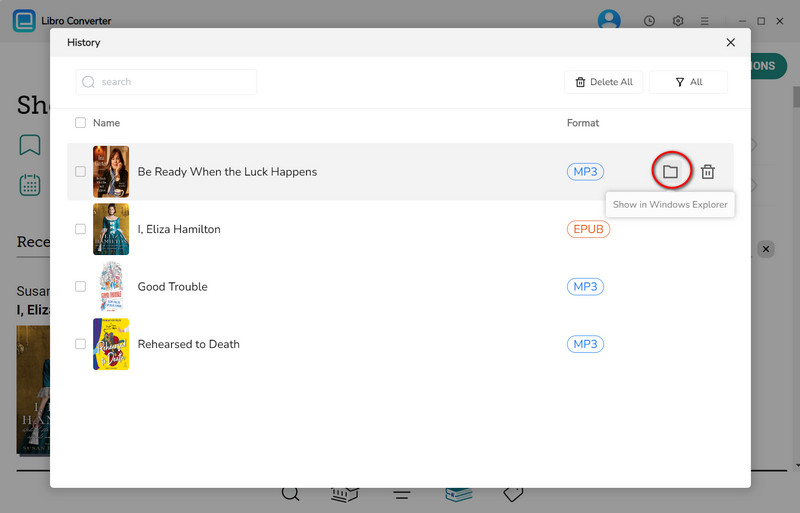
Step 6.After conversion, click the folder icon next to the title. Your converted Libby ebooks and audiobooks are now saved locally on your computer and remain accessible even after the Libby loan expires.
✅ Pros
- The Libby book never expires; it stays in your collection forever.
- Read or listen to Libby books on any device.
- Download multiple books and audiobooks at once to save time.
- Maintain a local library of all your Libby books without worrying about renewals or waiting lists.
❌ Cons
- AnyLibro Converter requires a purchase
Method 4: Listen to Libby Audiobooks Faster with Playback Speed Controls
If you prefer to stay within the official Libby app rather than downloading files for permanent storage, the most practical way to keep Libby books longer (or rather, make the time you have go further) is to increase the playback speed. You can turn a daunting 30-hour marathon into a manageable 20-hour listen.
How to Listen to Libby Audiobooks Faster with Playback Speed Controls:
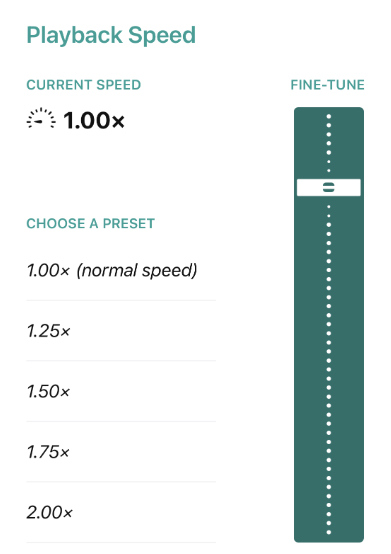
Step 1.While listening to an audiobook, look for the Speedometer (usually labeled “1x”) icon at the top of the screen and tap it.
Step 2.Libby gives you two ways to adjust how fast you listen:
Quickly jump to common speeds like 1.25x, 1.50x, or 2.00x.
Use the slider to set a custom speed anywhere from 0.6x to 3.0x.
Step 3.You can adjust the speed anytime while listening to maintain comprehension and comfort.
✅ Pros
- Ideal for long Libby audiobooks when your loan period is short.
- No extra software needed.
- Adjust the speed anytime to match your comprehension level.
❌ Cons
- Does not extend loan periods.
- Listening too fast may make it harder to absorb dense or story-driven content.
- Not ideal for narrative pacing.
Method 5: Switch to Spotify Premium to Finish Expired Libby Audiobooks
What if you missed the window to use AnyLibro Converter and your book has already disappeared? Before you jump back into a 2-month Libby waitlist, check your Spotify app. Since late 2023, Spotify Premium (for Individual, Duo, and Family plan managers) includes 15 hours of audiobook listening per month at no extra cost.
This is the perfect safety net for finishing the last few chapters of an expired Libby audiobook without needing to borrow it again.
See also: 15 Ways to Get Free Spotify Premium 2026 - 100% Worked!
How to Use Spotify as a Backup for Libby Audiobooks:
Step 1.Open Spotify and search for the book title you were listening to. Look for the label "Included in Premium". Spotify’s subscriber catalog includes over 250,000 titles, covering about 70% of the New York Times bestsellers.
Step 2.Since Spotify won't sync with your Libby progress, you’ll need to manually find where you left off.
Step 3.Spotify gives you 15 hours of listening time per month. This is more than enough to finish the final 20–30% of a book that expired on Libby. You can check your remaining hours in Spotify Settings > Account menu.
✅ Pros
- Finish Libby audiobooks even after the loan expires.
- No waitlists or holds; if it’s in the catalog, you can play it immediately.
- Works across multiple devices.
- Offline listening available with Spotify Premium.
- Flexible playback speed and easy bookmarking.
❌ Cons
- Not all Libby audiobooks are available on Spotify.
- Requires a Spotify Premium subscription.
- Libby highlights, notes, or bookmarks won’t sync to Spotify.
Method 6: Use Multiple Library Cards to Keep Books Longer
If you’re waiting for a popular Libby audiobook or ebook, borrowing from multiple libraries can help you keep books longer without rushing. This strategy is especially effective for readers with library cards from more than one library, allowing you to manage long audiobooks without the pressure of a single 7-day loan.
How to Use Multiple Library Cards to Keep Libby Books Longer:
Step 1.Tap the Menu (three lines) in the Libby app and select Add Library. Search for each library where you have an active card and sign in with your credentials. You can add an unlimited number of cards from different systems.
Step 2.Use Libby’s search to see if the audiobook or ebook you want is available at another library. Sometimes a title may be on hold at one library but immediately available at another.
Step 3.If your current loan is about to expire, borrow the same title from a different library. This allows you to continue reading or listening without interruption.
Step 4.Use the Suspend Hold feature (previously “Deliver Later”) to schedule holds on different libraries so you don’t lose your spot while waiting for a copy.
Step 5.Once one loan ends, immediately start the next loan from another library to maintain continuous access.
✅ Pros
- Extend access to popular Libby titles without breaking any rules.
- Great for long ebooks or audiobooks that exceed a single loan period.
- Works on all devices that support Libby.
❌ Cons
- Requires multiple active library cards.
- When you switch cards, Libby treats it as a "new" loan. You’ll have to manually find your place.
- Some libraries may limit simultaneous loans or holds.
- Slightly more management is needed to track holds across different libraries.
Method 7: Buy the Audiobook on Audible for Unlimited Listening
Sometimes, a book is so long or meaningful that even multiple Libby loan extensions aren’t enough. If you find yourself repeatedly renewing the same 30-hour epic, it might be time to move it from your “borrowed” shelf to your permanent collection. Purchasing the audiobook on Audible, the world’s largest provider of audiobooks, is the ultimate solution for those who want to keep Libby books forever without technical workarounds.
How to Use Audible to Solve the Libby Stress:
Step 1.If you have never used Audible, sign up for a 30-day trial and receive one free credit. This is perfect for "rescuing" a long Libby audiobook that is about to expire. You can use that credit to buy the book and own it permanently, even if you cancel the trial later.
Step 2.If you already own the Kindle ebook (or if it’s currently on sale for $0.99–$1.99), Amazon often offers the Audible narration at a massive discount (usually between $1.99 and $7.49). This removes the "7-day loan" stress forever.
Step 3.Use Libby for "one-time reads" and Audible for books you know will take a month to finish or titles you want to revisit. This keeps your Libby shelf clear for faster reads and ensures your long audiobooks are always available, even offline.
✅ Pros
- Unlimited listening with no loan expiration.
- Works on all Audible-supported devices.
- Full control over playback speed, bookmarks, and offline access.
❌ Cons
- Requires purchasing the audiobook, either with credits or money.
- Does not preserve Libby notes or highlights.
- Less suitable if you prefer free library borrowing.
- You are tied to the Amazon/Audible app for playback unless you use a converter.
Comparison Table: Which is the Best Way to Keep Libby Books Longer?
Choosing the right strategy depends on your device and how long you want to keep the book. Here is a quick breakdown of the 7 methods we covered:
| Method | Best For... | Permanent? | Offline Use? | Effort Level |
|---|---|---|---|---|
| 1. Official Renewal | Short extensions (3–7 days) | No | Yes | Low |
| 2. Airplane Mode | Kindle/E-reader users | Temporary | Yes | Medium |
| 3. AnyLibro Converter | Unlimited reading & listening | Yes | Yes | Medium |
| 4. Playback Speed | Power listeners (Audiobooks) | No | Yes | Low |
| 5. Spotify Premium | Rescuing expired audiobooks | No | Yes | Low |
| 6. Multiple Cards | High-demand titles | No | Yes | Medium |
| 7. Audible | Favorite books you'll re-read | Yes | Yes | High ($) |
Final Verdict: What Should You Use?
FAQs on How to Keep Libby Books Longer
Q1: Can Libby books be extended?
A: Yes. You can extend your loan by renewing the book within 3 days of its due date, if no one else is waiting. You can also set a longer default loan period for ebooks or audiobooks when borrowing.
Q2: How do I change the hold length on Libby?
A: Libby doesn’t allow you to directly change the hold period, but you can suspend your hold (previously called “Deliver Later”) to choose when to borrow the book, giving you control over when the loan starts.
Q3: How long can you keep books on Libby?
A: Loan periods vary by library and format. Typically, ebooks and audiobooks can be borrowed for 7, 14, or 21 days. After the loan expires, the book is automatically returned.
Q4: How to rip audiobooks from Libby?
A: Direct ripping is not supported. However, AnyLibro Converter allows you to legally convert your borrowed audiobooks into permanent files for personal use.
Summary
In short, Libby’s loan expiration reminders shouldn’t be a reason to put down a great book. While official renewals and Airplane Mode can help you keep Libby books longer temporarily, if you’re tackling epic 30-hour audiobooks or want to build a permanent personal digital library, using AnyLibro Converter to download your Libby audiobooks and ebooks into permanent MP3 or EPUB files is the most convenient and reliable solution. Say goodbye to waiting, say goodbye to stress, and truly own every book you borrow.
Note: During the trial version, you can only convert and save the first 20% of each book. To unlock full access and convert entire books, you’ll need the full version.

Clara Whitman
Clara specializes in creating practical guides for book lovers and digital reading tools.
With years of experience exploring apps like Libby, Kindle, and Audible, she shares clear, step-by-step tips to help readers get the most out of their eBooks and audiobooks.
 Libby Audiobook Converter
 All-In-One Music Converter
 Spotify Music Converter
 Apple Music Converter
 YouTube Music Converter
 Amazon Music Converter
 Tidal Music Converter
 Streaming Music Recorder
 Photo Enhancer AI
 Video Enhancer AI
 Audible Audiobook Converter