


Libby Inspire Me: How to Discover Personalized Books?
Have you ever finished a book on Libby and had no idea what to read next? If so, there's a great feature in Libby that can truly "inspire you". Officially launched in late August 2025, the Libby Inspire Me feature helps users discover hidden gems from their library's massive digital collection.
In this guide, we'll walk you through what the Libby Inspire Me feature is, how to use it step by step, and how to download Libby audiobooks and eBooks recommended by the Libby Inspire Me feature for offline access and long-term storage.
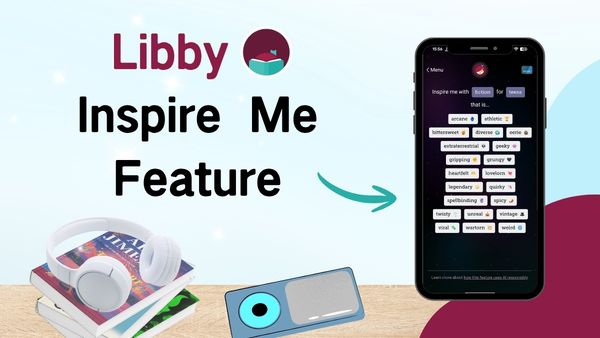
Part 1: What Is the Libby Inspire Me Feature?
Libby Inspire Me feature is an optional tool designed to help readers discover library titles through short, engaging prompts called "Inspirations". Built directly into the Libby app, it uses AI technology alongside your library's extensive digital collection to uncover hidden gems and deliver more personalized recommendations.
Instead of endlessly browsing categories or relying only on bestseller lists, "Inspire Me" works almost like a matchmaking tool — connecting your personal interests with the library's digital catalog in a smarter, more tailored way.
Part 2: How to Use Libby Inspire Me Feature?
Using the Inspire Me feature is very simple, the specific steps are as follows:
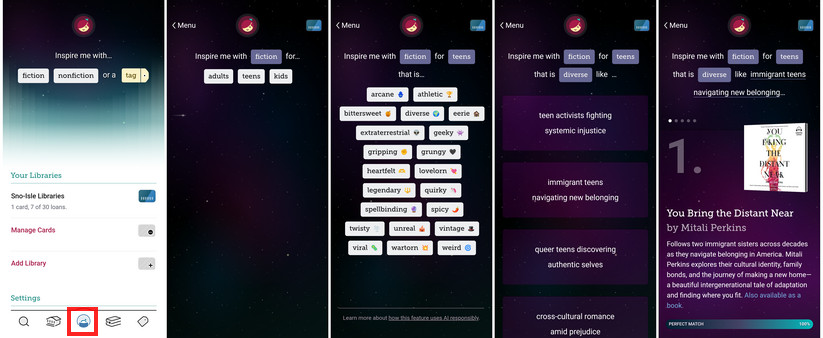
Step 1. Tap "Menu", then pick and choose from Fiction or Nonfiction, or a Tag.
Step 2. Select your age group from adults, teens, or kids.
Step 3. You'll then see a series of fun prompts. Choose the "inspiration" that interests you most.
Step 4. The system will recommend 5 eBooks or audiobooks that best match your selected "inspiration".
Tips:
- Libby prioritizes titles that are available to borrow immediately.
- If you choose "a tag", Libby will recommend books based on the titles saved in your tags (Make sure you have at least 20 books in your tagged list).
- If you can't find "Inspire Me" on your home page, simply go to the search bar and type: #InspireMe.
Part 3: How to Download Books Recommended by Libby's Inspire Me?
When you use the Libby Inspire Me feature, it's easy to discover several great books at once. But there's one problem: Libby loans usually last only up to 21 days, and some libraries have recently shortened it to just 14 days. How can you possibly finish an entire book in only two weeks — especially if you have a busy schedule or the book is particularly long?
That's why downloading your borrowed books is a great option. A reliable Libby downloader is something many readers eventually look for. AnyLibro Converter allows you to convert eBooks into EPUB format and audiobooks into MP3, M4A, or M4B files. Once converted, you can transfer the files to any device you prefer for reading or listening. It's also a convenient way to keep a personal backup, so you can revisit your favorite books later without borrowing them from Libby again.
AnyLibro Converter
Download Books Recommended by Libby's Inspire Me via AnyLibro Converter
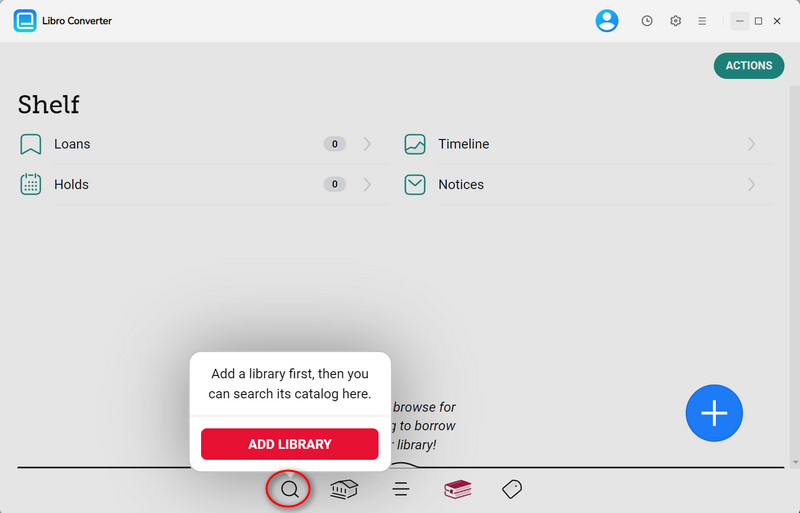
Step 1. Download AnyLibro Converter. Then, click the search icon at the bottom, and add your library card.
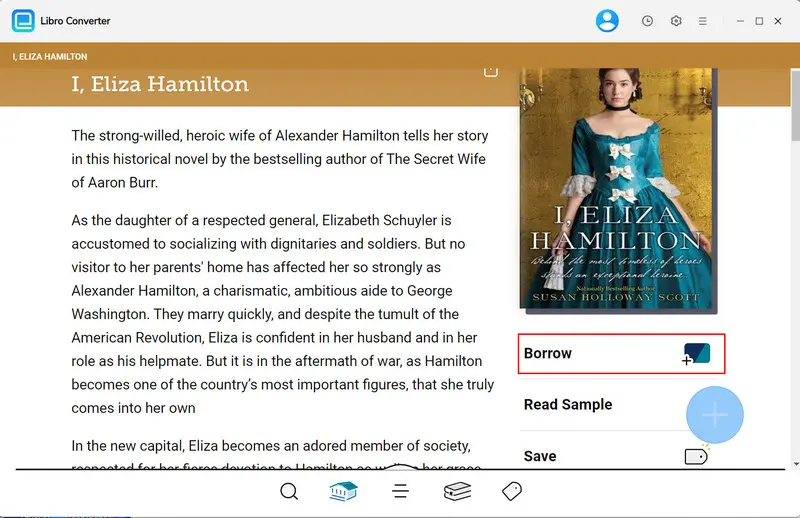
Step 2. Borrow those books recommended by the Libby Inspire Me feature.
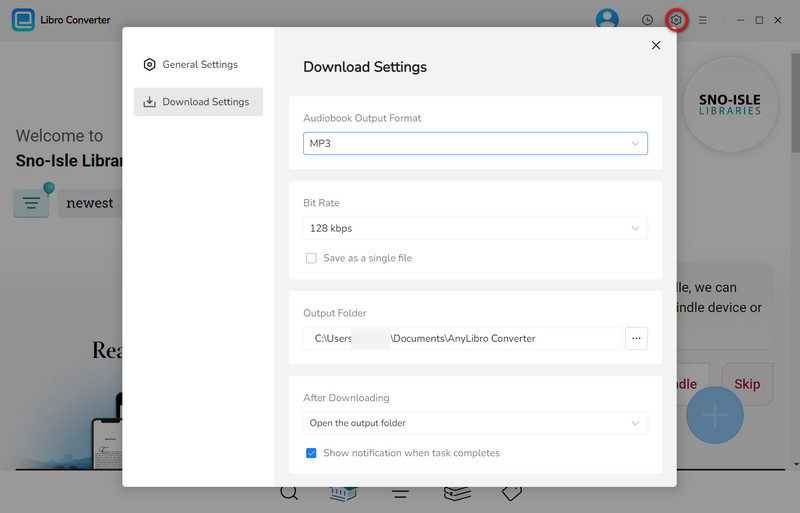
Step 3. Click the gear icon in the upper-right corner to open Settings. Choose the output format, bit rate, and output folder as needed.
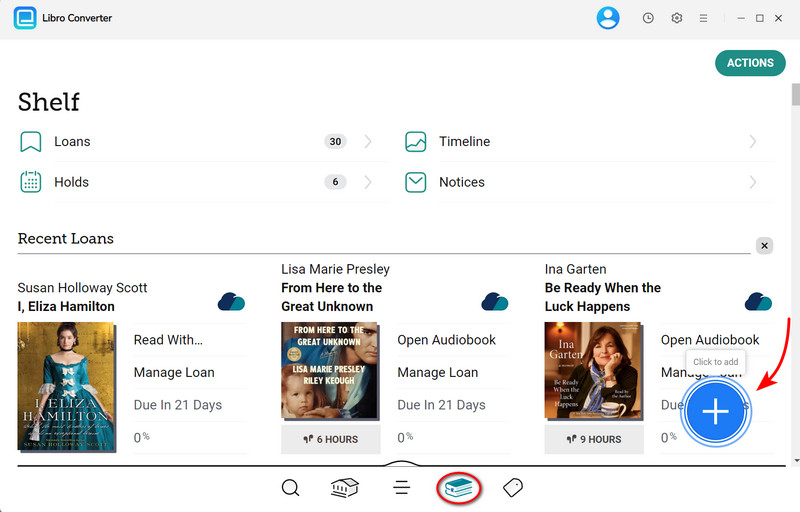
Step 4. Go to Shelf. Click the floating "+" button to add these eBooks/audiobooks to the conversion queue.
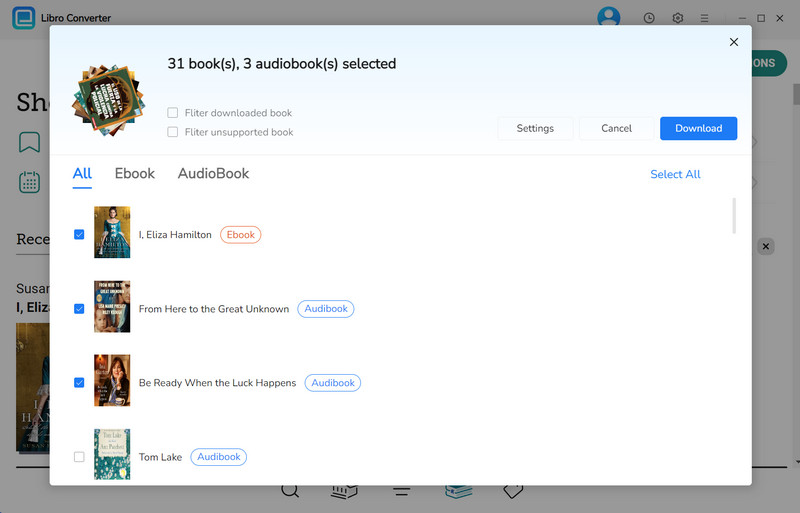
Step 5. Click the "Download" button to begin converting the selected eBooks/audiobooks.
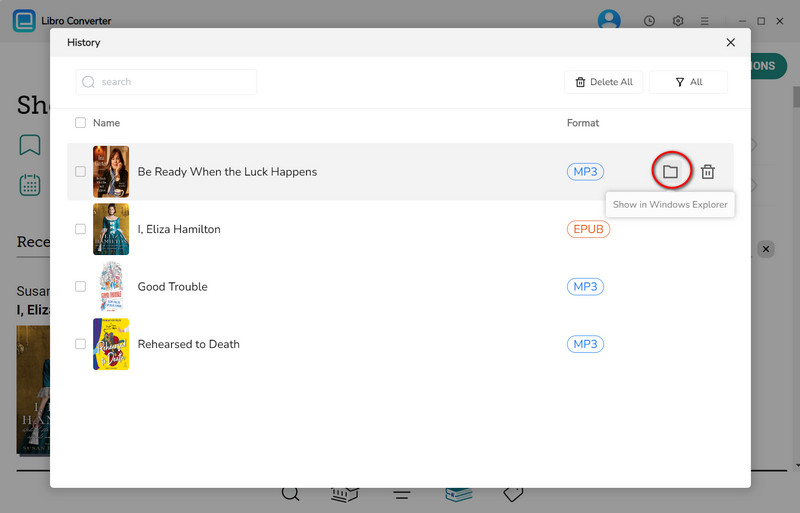
Step 6. Once conversion is complete, click the clock icon in the top-right corner to see finished downloads. Hover over a file and click the folder icon to open the output folder.
FAQs about Libby Inspire Me Feature
Q1: Is the Inspire Me feature free to use?
A: Yes. The entire Libby app is free for anyone with a valid library card.
Q2: Why are my Inspire Me recommendations inaccurate?
A: If you're new to Libby and have little or no borrowing history, the recommendations may not feel very accurate at first. Over time, the Libby AI recommendation system improves as you borrow and interact with more titles.
Q3: I can't find the Inspire Me feature on my Libby app — is it available on Android/iPhone?
A: Yes. The Libby Inspire Me feature is available on both Android and iPhone. If you can't find it in the menu, follow the steps mentioned in Tip 3 of Part 2 to enable the feature.
Q4: Can I save or download all the books suggested by Inspire Me at once?
A: Yes. After the Inspire Me feature recommends books, simply borrow the titles you want and follow the steps in Part 3 to download them using AnyLibro Converter for offline access.
Q5: Can I use Inspire Me on desktop?
A: Yes. The Libby Inspire Me feature is now available on desktop as well.
Q6: Does Libby AI collect my personal information when using the Inspire Me feature?
A: No. Libby does not share your personal details or reading activity with the AI model.
The End
In this guide, we've shared a detailed look at Libby Inspire Me feature. Why not give it a try right now? See what hidden gems you can discover. And if you're worried about limited borrowing periods, don't forget to use AnyLibro Converter to download and save these recommended books for a more flexible reading experience.
To be honest, quite a few Libby users aren't big fans of this feature. But in my opinion, it's actually very helpful for readers who don't know what to read next or feel overwhelmed by too many choices.
Note: During the trial version, you can only convert and save the first 20% of each book. To unlock full access and convert entire books, you’ll need the full version.

Clara Whitman
Clara specializes in creating practical guides for book lovers and digital reading tools.
With years of experience exploring apps like Libby, Kindle, and Audible, she shares clear, step-by-step tips to help readers get the most out of their eBooks and audiobooks.

 Libby Audiobook Converter
 All-In-One Music Converter
 Spotify Music Converter
 Apple Music Converter
 YouTube Music Converter
 Amazon Music Converter
 Tidal Music Converter
 Streaming Music Recorder
 Photo Enhancer AI
 Video Enhancer AI
 Audible Audiobook Converter