


Best 4 Libby Audiobook Exporters: How to Download Libby Books to MP3
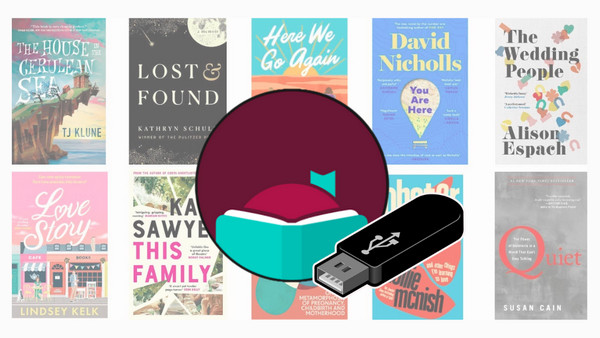
Libby makes borrowing audiobooks from libraries simple, but it doesn’t allow direct MP3 exports, and loans expire in 21 days. Many users want to listen to Libby audiobooks on other devices—like Garmin watches, older iPods, or car audio systems—or save audiobooks for offline use forever.
In this guide, we review 4 trusted Libby audiobook exporters—Anylibro, LibbyRip, Libby Downloader, and Audacity—ranked by features, pros, and cons. You’ll learn which tool fits your needs and how to safely download Libby audiobooks to MP3 for personal use.
Comparison Table: At a Glance of Top 4 Libby Audiobook Exporters
To help you choose the right tool for your needs, we’ve summarized the top 4 Libby audiobook exporters in this at-a-glance comparison table, highlighting their strengths, OS compatibility, formats, and whether they are free or paid.
| Feature | AnyLibro Converter | LibbyRip | Libby Downloader | Audacity |
|---|---|---|---|---|
| Best For | Beginners & Large Collections | Tech-savvy / DIY Users | Firefox Users / Simple Grab | "Last Resort" Recording |
| Ease of Use | ⭐⭐⭐⭐⭐ | ⭐⭐⭐ (Technical setup) |
⭐⭐⭐⭐ | ⭐⭐ |
| Batch Download | ✅ Yes (Entire Shelf) | ❌ No (One by one) | ❌ No (One by one) | ❌ No (Real-time) |
| ID3 Tags | ✅ Auto-preserved | ✅ Supported (via script) | ✅ Basic info included | ❌ Manual entry only |
| Chapters | ✅ Perfectly Split | ✅ Supported (via script) | ✅ Included (.cue file) | ❌ Manual marking |
| Keep Forever | ✅ Yes | ✅ Yes | ❌ No (Loan period only) | ✅ Yes |
| Speed | ⚡ High Speed | ⚡ High Speed | ⏳ Normal Speed | 🐢 Very Low (1:1) |
| Formats | MP3, M4B, M4A | MP3, M4B | MP3 | MP3, WAV, FLAC, etc. |
| OS / Platform | Windows, macOS | Browser (Any) + Python | Firefox (Any OS) | Windows, macOS, Linux |
| Price | Paid (Free Trial) | 100% Free | 100% Free | 100% Free |
#1. AnyLibro Converter - Best Libby Audiobook Exporter in 2026
* Best For:
Beginners looking for an easy way to export ibby books to MP3
Users who want offline listening or reading on any device
* OS system: Windows, macOS
* Review: ⭐⭐⭐⭐⭐
Overview: AnyLibro is a trusted Libby audiobook exporter that keep your books forever by bypassing the 21-day expiration. It lets you batch download Libby audiobooks to MP3/M4A/M4B, while keeping crystal-clear quality and ID3 tags intact. You can play them on any device, like MP3 players, Kindle, Alexa, or car audio systems. AnyLibro also supports download Libby ebooks to EPUB.
AnyLibro Converter
How to Download Libby AudioBooks to MP3 via AnyLibro
AnyLibro is designed for simplicity. Follow these five steps to convert your library loans into permanent MP3 files for your devices.
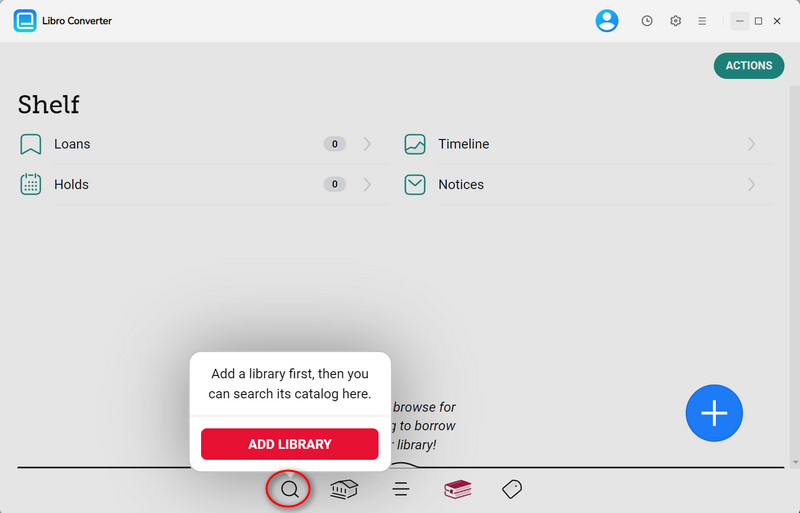
Step 1. Link Your Library Card
Launch AnyLibro and select the Search (magnifying glass) icon at the bottom of the screen. Use the search bar to locate your local library by name or city. Once found, sign in using your Library Card Number and PIN.
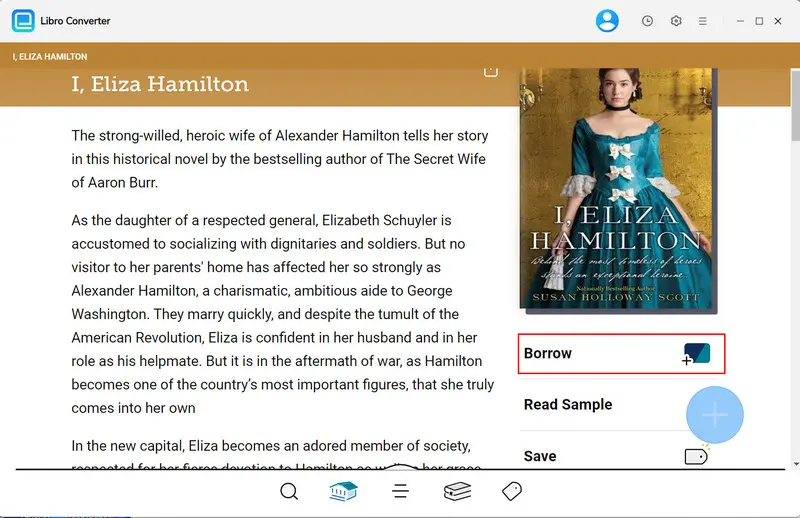
Step 2. Borrow Libby Audiobooks
Within the AnyLibro interface, browse or search for the audiobooks (or eBooks) you wish to download. Click Borrow to add them to your library account.
Pro Tip: If you've reached your loan limit, return an old book first to free up a slot for your new download.
Step 3. Step 3: Set MP3 as Output format
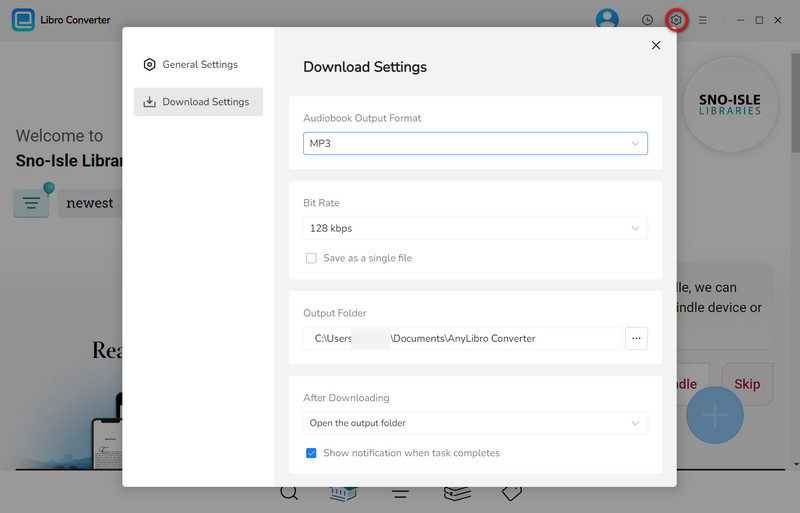
Before downloading, click the Gear (Settings) icon. Select MP3 for universal compatibility or M4B if you want a single file with saved playback positions.
Step 4. Convert Audiobooks to MP3
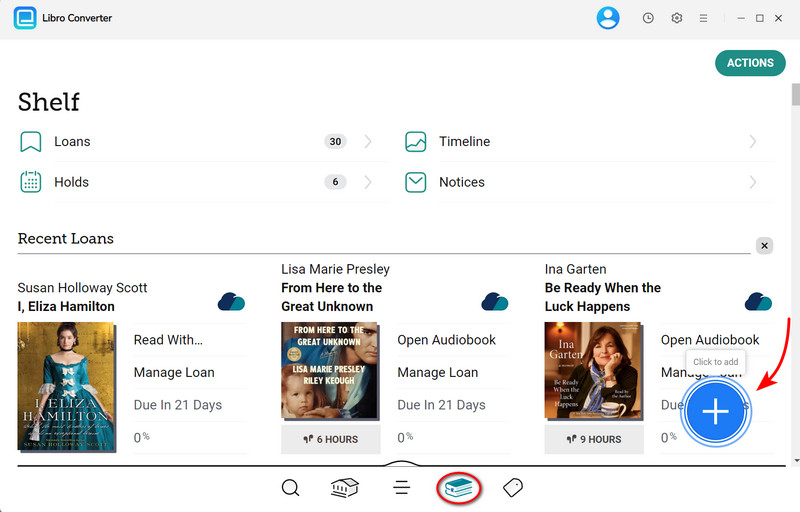
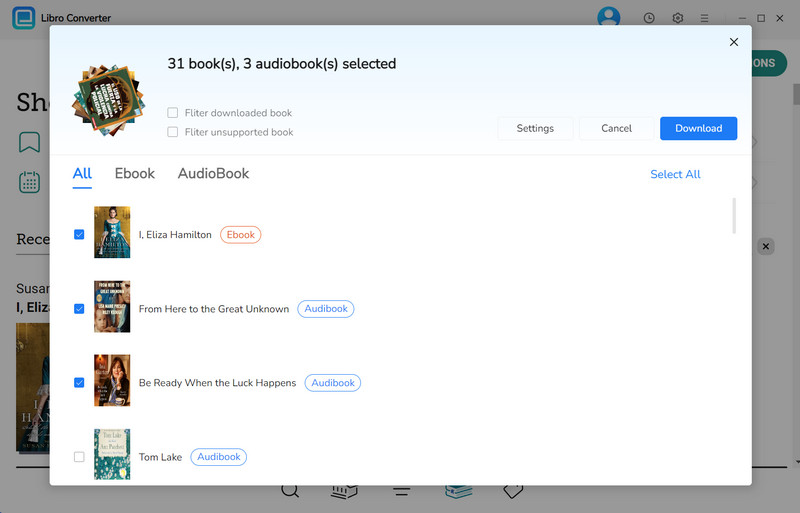
Click the Books icon to navigate to your Shelf. Locate the book you wish to keep, then click the floating "+" button in the lower-right corner. AnyLibro will analyze the file and add it to the conversion queue. Finally, click the Download button to start the extraction process.
Step 5. Find Your Permanent Audiobooks
Once the progress bar reaches 100%, you can find your files in two ways:
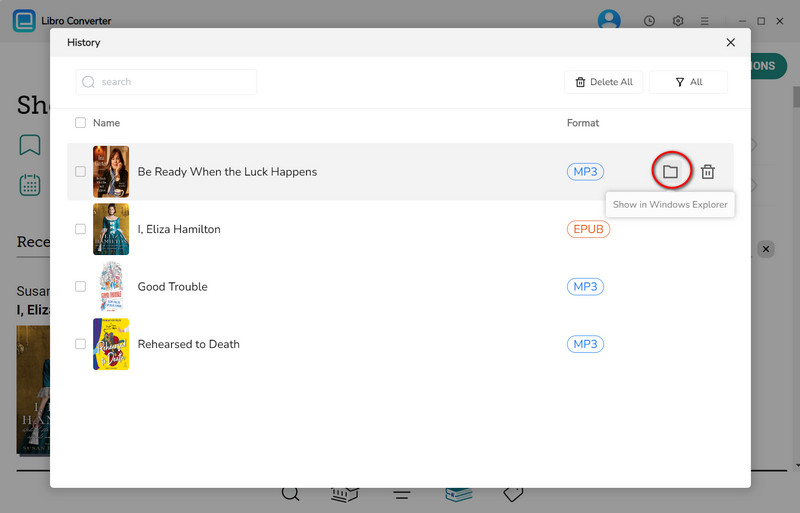
- 1. Click the Folder icon directly next to the book title.
- 2. Click the Clock (History) icon at the top right to see all past downloads. Hover over the folder icon to open the exact location on your computer.
-
From here, you can simply drag and drop the files onto a USB drive, iPod, etc.
#2 LibbyRip - Free Libby Audiobook Exporter
* Best For:
Tech-savvy users who want a 100% free, open-source way to keep Libby books
* OS system: Windows, macOS, Linux (Any OS with a browser and Python)
* Review: ⭐⭐⭐⭐
LibbyRip (https://github.com/PsychedelicPalimpsest/LibbyRip) is a popular, free Libby audiobook exporter available on GitHub. Instead of a traditional app, it runs in your browser, utilizing a simple script to extract audio directly from the Libby web player. It's well-known on Reddit for being transparent and dependable. With an extra Python script, you can include metadata such as titles, chapters, and cover art, giving your downloads the appearance and feel of professional audiobooks. However, if you run into a bug, you’ll need to check Reddit or GitHub "Issues" for a solution.
✅ Pros
- Free and open-source
- Works directly in the browser, no full app required
- Supports chapters, titles, and cover art
❌ Cons
- Requires installing Tampermonkey and basic setup
- Not beginner-friendly; some technical steps involved
- No official customer support
- Metadata requires extra configuration
How to Rip Libby AudioBooks to MP3 via LibbyRip :
Step 1: Install the Tampermonkey browser extension (Chrome, Edge, or Firefox).
Step 2: Go to the LibbyRip GitHub page and click the link to “Install” the script.
Step 3: Open libbyapp.com, sign in, and borrow the audiobook you want. Start playing it—once playback begins, a LibbyRip button will appear near the player.
Step 4: Click the LibbyRip button. Keep the tab open and let the audiobook play (you can mute it, but don’t pause). LibbyRip will export audio files to your browser’s Downloads folder.
Step 4 (Optional): For a clean audiobook file, use the optional Python script from GitHub to merge files and add chapters, titles, and cover art automatically.
Step 5: After processing, you’ll get a single MP3 file.
#3 Libby Downloader – Free Libby Download Extension for Firefox
* Best For:
Users who want to download Libby audiobooks to MP3 for free
Those who prefer not to use Python scripts
* OS system: Windows, macOS, Linux (Any OS with a Firefox browser)
* Review: ⭐⭐⭐
Libby Downloader (https://github.com/bookbonobo/libby-download-extension) is a lightweight, open-source Libby audiobook download extension for Firefox created by bookbonobo. Compared to LibbyRip, it’s more beginner-friendly and runs entirely in the browser without requiring Python or command-line tools. The extension automatically merges Libby’s small audio segments into a single MP3 file and generates a .cue file for chapter navigation.
Note: This tool is designed for portability, not permanent storage. Downloaded files follow the original loan period, and expiration information is usually written into the filename or ID3 tags. Try AnyLibro wihout these issues.
✅ Pros
- 100% free to use
- Browser-based, no desktop software required
- Generates .cue files for chapter navigation
- No terminal or Python commands needed
❌ Cons
- Only supports Firefox
- Does not extend borrowing time or bypass expiration
- Limited format options (mainly MP3/M4A)
- Fewer advanced options than LibbyRip or AnyLibro
- No official customer support
How to Download Libby Audiobooks via Libby Downloader:
Step 1: Add Libby Downloader from the Firefox Add-ons store.
Step 2: Log in to libbyapp.com and start playing your audiobook.
Step 3: Click the Libby Downloader extension icon in your toolbar.
Step 4: Click “Download” to save the merged MP3 as a ZIP file.
#4 Audacity – Free Libby Audiobooks Recorder
* Best For:
Recording and saving Libby audiobooks manually
* OS system: Windows, macOS, Linux
* Review: ⭐⭐
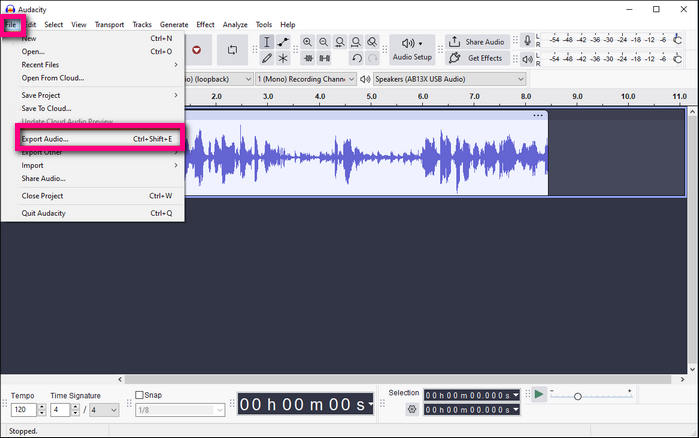
Audacity is a well-known, free, open-source audio editor. Unlike other Libby audiobook exporters, it does not download audiobooks directly. Instead, it records the audio in real time as the audiobook plays on your computer. This method works even when other tools fail. While it’s more time-consuming, it gives you full control over audio quality, editing, and the final output.
✅ Pros
- 100% reliable and completely free
- Can export to MP3, M4A, WAV, and more
- Allows trimming silence, boosting volume, or recording specific sections
❌ Cons
- Must record in real time, which can be slow for long audiobooks
- No automatic metadata or chapter support
- Harder for beginners compared to dedicated tools like AnyLibro
How to Record Libby Audiobooks via Audacity:
Step 1: Download and install Audacity from audacityteam.org.
Step 2: Set the Audio Host to Windows WASAPI and choose your speakers or headphones as the Recording Device. On macOS, use a tool like BlackHole to route system audio into Audacity.
Step 3: Open libbyapp.com in your browser, load the audiobook, and move the playhead to the beginning.
Step 4: Click Record in Audacity, then immediately press Play on the audiobook. You can mute your speakers, but keep system volume active.
Step 5: When finished, click Stop, then go to File → Export → Export as MP3. Add metadata such as title, author, and cover art manually if needed.
Part 4: FAQs about Libby Audiobook Exporters
Q1: Can I keep Libby audiobooks forever?
A: Yes, but it depends on the tool. AnyLibro is the best tool to help you save Libby audiobooks and eBooks permanently.
Q2: Can I play downloaded Libby audiobooks on any device?
A: Yes, as long as the file format is supported. MP3 works on almost all devices, including MP3 players, Kindle, Alexa, and cars.
Q3: Is it legal to export audiobooks from Libby?
A: All these tools are intended for educational and personal use only. The developers do not condone or encourage illegal activity, including unauthorized distribution of copyrighted content.
Q4: Can I convert Libby eBooks to Kindle format using these tools?
A: Yes, but only with AnyLibro Converter. It is the only tool on this list that handles both Libby audiobooks and eBooks. Once you have the EPUB file, you can easily send it to your Kindle via the "Send to Kindle" service or Calibre.
Final Verdict: Which Libby Audiobook Exporters Should You Use?
After comparing the top Libby audiobook exporters, AnyLibro Converter clearly stands out. While free tools like LibbyRip or Libby Downloader can work, they often come with technical hurdles, browser limitations, or manual steps.
AnyLibro Converter makes it easy: you can batch download your entire library, preserving chapters, titles, authors, and cover art, and even keep books forever by bypassing the 21-day loan limit. It also supports Libby EPUB eBooks, making it a versatile choice for both listeners and readers. Ready to download your Libby audiobooks and eBooks to MP3 and keep them forever? Try AnyLibro Converter today!
Note: During the trial version, you can only convert and save the first 20% of each book. To unlock full access and convert entire books, you’ll need the full version.

Clara Whitman
Clara specializes in creating practical guides for book lovers and digital reading tools.
With years of experience exploring apps like Libby, Kindle, and Audible, she shares clear, step-by-step tips to help readers get the most out of their eBooks and audiobooks.
 Libby Audiobook Converter
 All-In-One Music Converter
 Spotify Music Converter
 Apple Music Converter
 YouTube Music Converter
 Amazon Music Converter
 Tidal Music Converter
 Streaming Music Recorder
 Photo Enhancer AI
 Video Enhancer AI
 Audible Audiobook Converter
 Music Library Manager