


5 Best Libby Downloaders in 2026: Save Audiobooks & eBooks
If you've been using Libby for a while, you know the drill. Sign in with your library card, borrow a great audiobook and ebook, and then lose it after 21 days. Getting them on your Kindle is easy, but it is a crack to put on other MP3 players or e-readers that don't work well with the Libby app.
Thankfully, a Libby downloader may address such inconvenience. On this page, we collect and review the top 5 Libby downloaders that still work in 2026, including desktop apps, browser extensions, and GitHub tools.
Quick Overview of 5 Best Libby Downloaders [2026 List]
These are the top 5 Libby downloaders for audiobooks and ebooks — tested honestly and shown to you in this comparison list, with their highlights and shortcomings.
| Feature | AnyLibro Converter | Epubor LibAudio Mate | Libby Audiobook Downloader | libby-web-fetch | LibbyRip |
|---|---|---|---|---|---|
| Type | Desktop | Desktop | Desktop | Extension | Userscript |
| Ease of Use | Easy | Intermediate | Intermediate | Advanced | Advanced |
| Audiobooks | ✓ MP3/M4A/M4B | ✓ MP3 | ✓ MP3 | ✓ MP3 parts | ✓ MP3 parts |
| eBooks | ✓ EPUB | ✗ | ✗ | ✗ | ✓ EPUB in Beta version |
| Batch Download | ✓ | ✓ | ✓ | ✗ | ✗ |
| Free to Use | Trial (20%) | 3 books free | $14.99/Year | ✓ | ✓ |
| Keep Metadata | ✓ | ✓ | N/A | N/A | ✓ |
| Recommendation | ⭐⭐⭐⭐⭐ | ⭐⭐⭐ | ⭐⭐⭐ | ⭐⭐⭐ | ⭐⭐⭐⭐ |
#1. AnyLibro Converter - Best Libby Audiobook & e-Book Downloader in 2026
🔗 Link: https://www.any-ebook-converter.com/anylibro-converter/
📲 Availabilty: Windows PC & macOS
⭐Recommendation Level: ★★★★★
AnyLibro Converter goes unsurprisingly to the top pick for downloading Libby audiobooks & eBooks for offline enjoyment. This Libby downloader is dedicated to batch converting Libby audiobooks to MP3, M4A, M4B, and eBooks to EPUB files, without sound quality loss.
Additionally, it backs up your top Libby titles to the local computer forever while preserving cover art and all metadata, including title, author, and chapter information. With it, you're free to play them on Alexa, MP3 players, car systems, or any other devices.
AnyLibro Converter
How to Download Libby AudioBooks to MP3 via AnyLibro
AnyLibro is designed for simplicity. Follow these five steps to convert your library loans into permanent MP3 files for your devices.
Step 1. Sign in Your Library Card
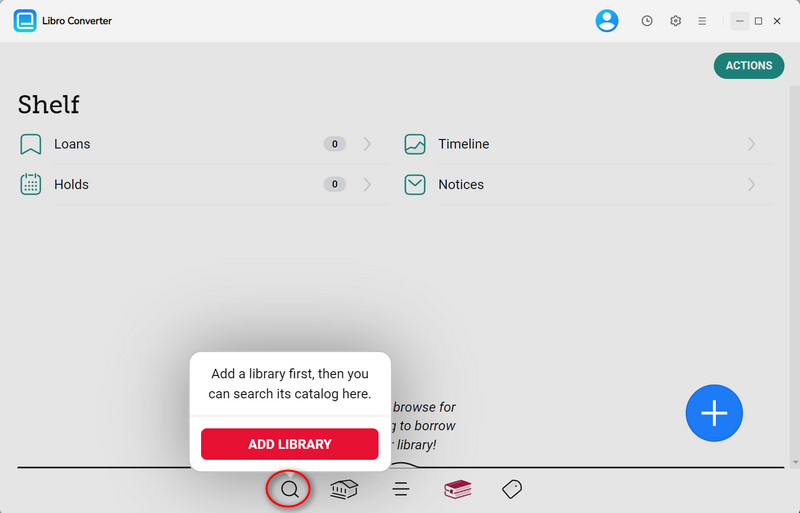
Run AnyLibro and click on the Search icon at the bottom of the screen. Here sign in by using your Library Card Number and PIN.
Step 2. Borrow Libby Audiobooks or eBooks
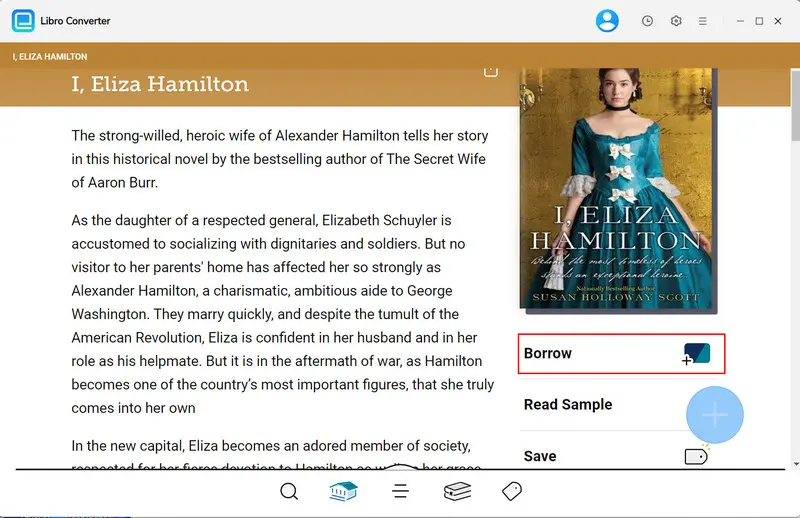
On the AnyLibro interface, locate to the audiobooks (or eBooks) you desire to download. Click Borrow to add them to your Shelf
Pro Tip: If you've reached your loan limit, return an old book first to free up a slot for your new download.
Step 3. Step 3: Choose Output format for Libby
Open the settings window by clicking on the Gear icon. Pick MP3 for audiobook or EPUB if you want to download Libby eBooks.
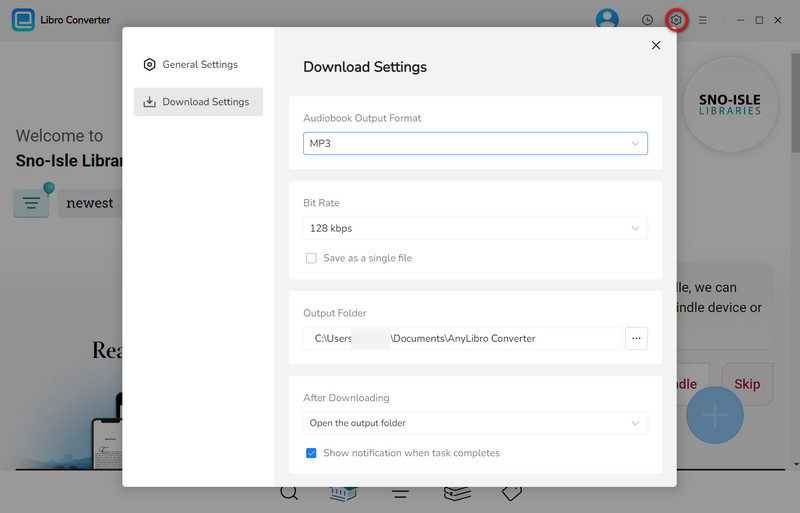
Step 4. Export Audiobooks to MP3
Now open the Shelf and Locate the book you wish to keep, then click the floating "+" button in the lower-right corner. AnyLibro will detect the file and add it to the conversion list. Finally, click the Download button to activate conversion.
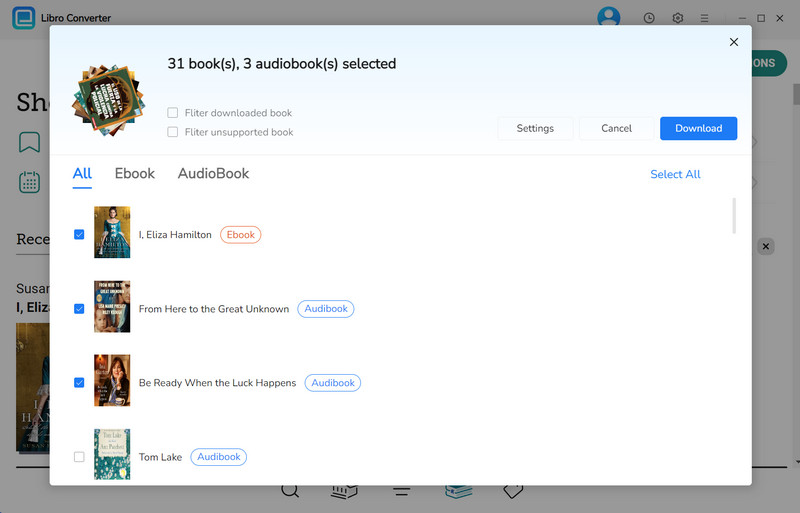
Step 5. Check Downloaded Libby Audiobooks
Once complete, you can find your files in the History. Then hover over the folder icon to open the exact location on your computer
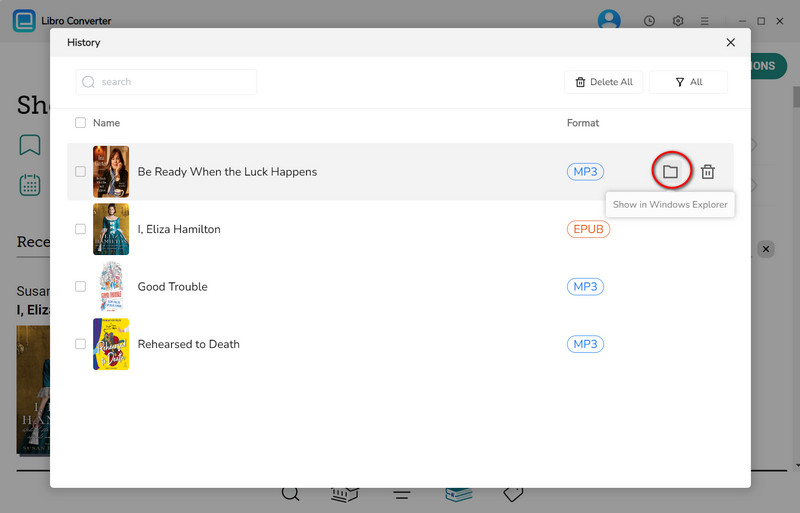
✅ What You May Like:
- Safe, ad-free, intuitive interface.
- Batch conversion & fast speed.
- Handles Libby audiobooks, eBooks, and magazines.
- Multiple formats and advanced options.
- Preserves full metadata & cover art.
- Comes with customer care and technology support.
❌ The Catch:
- The trial version only converts the first 20% of each title.
📚 Our Real Experience:
Honestly, the setup and afterward use here is the most straightforward of anything we tested. The output MP3 had the right title, the right author, and the cover art embedded. While it has the trial limit, it is enough to confirm the quality before you buy. It is best suited for someone who borrows Libby books regularly.
#2 Epubor LibAudio Mate - Libby Audiobook Downloader Desktop
🔗 Link: https://www.epubor.com/libaudio-mate.html
📲 Availabilty: Windows PC & macOS
⭐Recommendation Level: ★★★
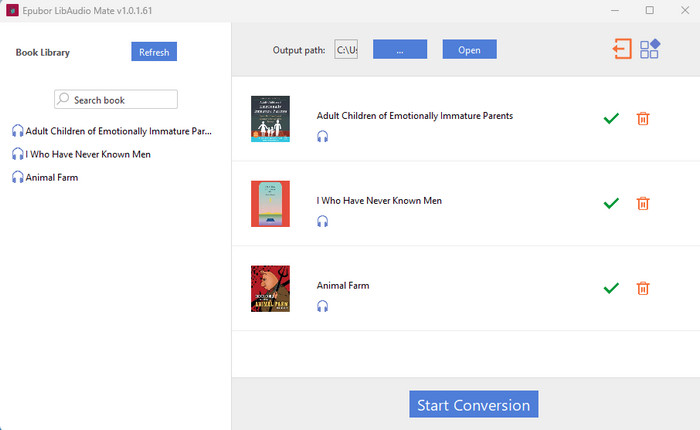
Compared with AnyLibro, Epubor LibAudio Mate is more focused on converting Libby audiobooks to MP3. It mainly exports your Libby audiobooks as MP3 files in batches, with downloaded titles organized by chapter. But the workflow can be fussy for newbies: you first have to set up an Android emulator and download audiobooks through the Libby Android app; then it detects them and converts them.
✅ What You May Like:
- The app interface does not embed ads.
- Stable to use.
- Allows downloading multiple books at once.
- Preserves basic metadata for each chapter.
❌ The Catch:
- Only 3 free conversions of Libby audiobooks.
- Limited to the MP3 format for audiobooks.
- Complex operation before conversion even begins.
- Occasionally fails to fetch books if the Android emulator setup is off.
How It Works:
Step 1: Install an Android emulator: LDPlayer for Windows or Android Studio for Mac, then install the Libby app on the emulator.
Step 2: Sign in with your library card, locate the books, and download them inside the Libby app.
Step 3: Run the converter and let it refresh and detect your library on the left tab.
Step 4: Select Libby audiobooks, choose the output path, then click on "Start Conversion."
📚 Our Test Experience:
In testing, the first part isn't beginner-friendly. The emulator setup actually took about 30 minutes, partly because LDPlayer had a weird quirk with my display drivers. Once past that, the final step of using LibAudio Mate part was simple. Hit Refresh, the book appeared, dragged it over, and clicked Convert. It finalized two book conversions in about three minutes. We also found that The tool only works for audiobooks, not for eBooks.
#3. Libby Audiobook Downloader - Convert Libby Audiobook to MP3 Fast
🔗 Link: https://www.ebook-converter.com/libby-audiobook-downloader.htm
⚙️Device Availability: Windows PC & macOS
⭐Recommendation Level: ★★★
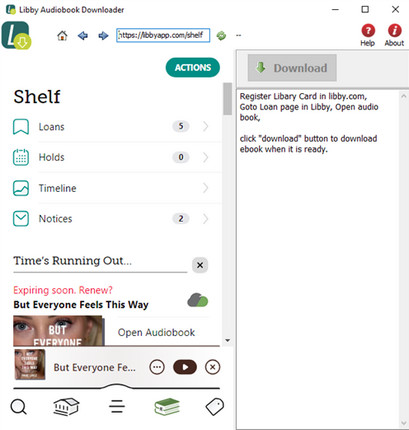
Another desktop Libby audiobook downloader that turn public library audiobooks into MP3 files. The tool connects to the Libby library, lets users browse and select borrowed audiobooks, and saves them as local audio files. Apart from single-book downloads, you can queue multiple titles and run them in the background. But be warned: the app isn't constantly updated, so you may run into unknown bugs and have to wait a long time for troubleshooting.
✅ What You May Like:
- No ads.
- Batch download multiple titles.
- Auto-embed chapter markers and cover art.
- Downloaded MP3 files can be played on any device.
❌ The Catch:
- Old-style interface, not intuitive enough.
- Not able to download e-book.
- Not stable, with occasional crashes.
- A paid license is required for full access.
How It Works [Tutorial]:
1. Run the installer and enter your library name and card number.
2. Find the borrowed titles on the loan and wait for the app to load.
3. Start converting audiobooks by clicking on the Download button; it will download the books, chapter by chapter, and save the MP3 files in a subfolder.
📚 Our Real Experience:
Installation is fast, just like other normal apps. Queued two audiobooks and clicked Download. Both came through as MP3s with the title. But it doesn't always function well; the app sometimes gets stuck on the screen, and you have to force-quit and relaunch it.
#4. libby-web-fetch - Libby Downloader Chrome Extension
🔗 Link: https://github.com/bgschiller/libby-web-fetch
⚙️Device Availability: Online Browser
⭐Recommendation Level: ★★★
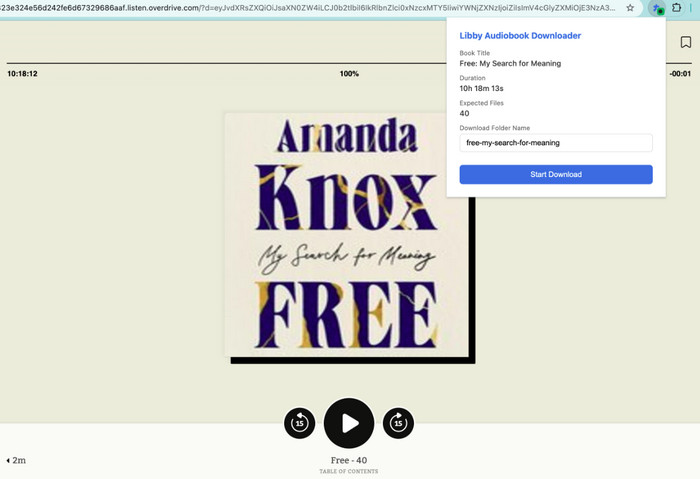
If you'd rather have an online free solution for downloading Libby books as MP3 files, the Chrome extension Libby Web Fetch also works. It is shown as an on-page banner on the top right, steps through the book with the "forward 15 seconds" button, and then extracts the media from your Libby web player to MP3 files. Notably, this extension requires a manual install from GitHub (not the Chrome Web Store), so it's not a one-click thing. Overall, it is more suitable for someone comfortable with their browser settings.
✅ What You May Like:
- A free and open-source tool. (from GitHub)
- No need to create an account for conversion.
- Support monitoring the download progress in real time.
❌ The Catch:
- Tech-savvy setup.
- Real-time recording, with a slow speed.
- One audiobook at a time.
- Downloads in sequential part files. (not a full single MP3).
How It Works:
1. Find the libby-web-fetch code on GitHub.com, and download the ZIP. Then unzip it to a local folder.
2. In Chrome settings, enable Developer Mode, then load this unpacked extension into the browser.
3. Visit libbyapp.com and play an audiobook; the extension icon will show a green dot when it's active.
4. Click the extension icon, and start downloading the audio.
5. You can browse other tabs while it runs. Once complete, the book folder contains numbered MP3 part files ready to use.
📚 Our Real Experience:
What we liked is that you're downloading exactly what Libby's own player has, so there are no wrong audiobook conversions. But it is more complicated than what you've imagined. You need to download the repository, enable developer mode in Chrome, and load it as an unpacked extension.
#5. LibbyRip - Libby Audiobook Ripper on GitHub
🔗 Link: https://github.com/PsychedelicPalimpsest/LibbyRip
⚙️Device Availability: Online Browser
⭐Recommendation Level: ★★★★
LibbyRip acts as a Libby audiobook downloader on GitHub, combining Tampermonkey with a browser userscript to download titles from Libby. It typically runs inside your existing browser (Chrome, Firefox, Edge, whatever) and adds a download button directly onto the Libby player page. With the related tab clicked, then LibbyRips exports audio files to your browser's Downloads folder, with basic tags kept.
✅ What You May Like
- Free to install, run, and use.
- Offers an EPUB downloader.
- Support embedded titles, cover art, and part of chapter metadata.
- Runs on any OS with a supported browser.
❌ The Catch
- Requires Tampermonkey setup first.
- You must keep the audiobook playing during export.
- Metadata requires extra configuration.
- No user care support.
How It Works:
1. Install the Tampermonkey extension for your browser. (It is available for Chrome, Firefox, Edge, and Safari.)
2. Go to the LibbyRip GitHub page and click "Install" to add the script.
3. Now play the audiobook you intend to download, and then you'll find a LibbyRip button near the player controls.
4. Click on this button, and LibbyRip exports files as they stream to your Downloads folder.
Tips: If you want to add tags and cover art to the audiobook file, get the Python bakeMetadata script installed and let it run.
📚 Our Real Experience:
The free service is cool when you want to download MP3 audiobooks from Libby. But some technical steps are involved, especially in adding the metadata. If you're not familiar with the terminal at all, skip to the Python GUI option.
FAQs about Libby Downloaders
Q1: Is it safe to use Libby Downloader?
A: It depends. For example, the verified desktop tool, AnyLibro Converter, is safe to install and use. But some open-source tools (like libby-web-fetch and LibbyRip) require additional setup, which usually comes from a third-party platform. It is advisable to download them with caution.
Q2: Is it legal to download Libby audiobooks?
A: Not 100% official. All tools are for personal or educational use only. Do not distribute downloaded media for commercial use. Keep using these tools responsibly and abiding by the creator's copyright.
Q3: Do these tools work with all libraries that use Libby?
A: They usually work with the Libby web player at libbyapp.com (aside from AnyLibro), all of which covers most audiobooks in the Libby library but does not support e-books. For the maximum use of your library, the AnyLibro converter is the best solution. You can download both audiobooks and e-books in generic format with it.
Q4: Can I keep downloaded Libby titles forever?
A: Yes. With locally saved Libby books via AnyLibro, you can keep them playable forever.
Wrapping It Up
We hope that the overall analysis of the top 5 Libby downloaders will help you choose the right tool for you without feeling overwhelmed.
For the technically familiar who don't want to pay for anything, libby-web-fetch and LibbyRip are common options. But if you prefer a clean, reliable way to save Libby books to MP3 or other formats permanently, AnyLibro Converter is a no-brainer. It does a perfect job of converting Libby audiobooks and eBooks, with full quality and metadata preserved. Start your limitless reading experience today!
Note: During the trial version, you can only convert and save the first 20% of each book. To unlock full access and convert entire books, you’ll need the full version.

Clara Whitman
Clara specializes in creating practical guides for book lovers and digital reading tools.
With years of experience exploring apps like Libby, Kindle, and Audible, she shares clear, step-by-step tips to help readers get the most out of their eBooks and audiobooks.
 Libby Audiobook Converter
 All-In-One Music Converter
 Spotify Music Converter
 Apple Music Converter
 YouTube Music Converter
 Amazon Music Converter
 Tidal Music Converter
 Streaming Music Recorder
 Photo Enhancer AI
 Video Enhancer AI
 Audible Audiobook Converter