


How to Use Libby Audiobooks: Complete Feature & Tip Guide
Libby has completely transformed the way people read and listen to books. And Libby audiobooks are especially popular. Whether commuting, working out, doing chores, or winding down before bed, listening has become a convenient alternative to traditional reading. But are you really making the most of Libby audiobooks?
In this guide, we'll walk you through 6 essential Libby audiobook features and answer some common questions users run into while listening. Most importantly, we'll introduce a way to download Libby audiobooks, so you can listen anytime, anywhere, and on any device — without being limited by the app.
Part 1: Key Features of Libby Audiobooks
Whether you're new to Libby or already using it regularly for audiobooks, understanding these 6 features can make your listening experience smoother, more flexible, and more personalized.
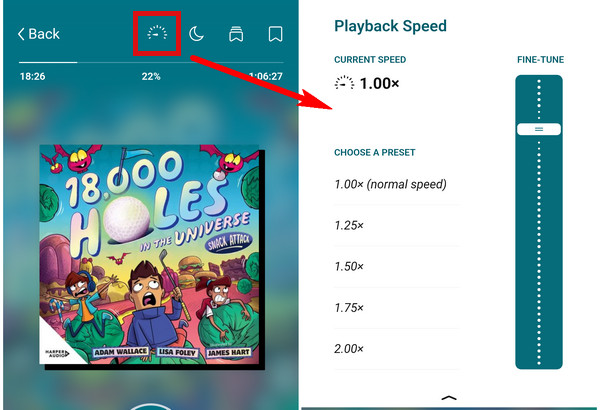
1. Playback Speed ⏱️
Adjusting the playback speed of an audiobook lets you tailor the listening experience to your own pace. Whether you want to finish a book faster or slow it down to fully absorb the content, you can choose a speed that feels natural and comfortable for your ears.
Steps: Tap the "Speed" icon at the top of the screen > Choose a preset or drag the "Fine-tune" slider.
2. Sleep Timer 🌙
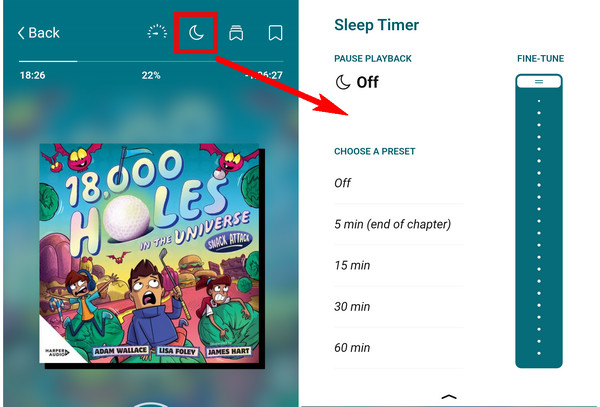
Setting a sleep timer lets you drift off to your audiobook without worry. Playback stops automatically at your chosen time, ensuring you won't miss much content, drain your battery overnight, or wake up in the middle of the night to a book still playing.
Steps: Tap the "Moon" icon at the top of the screen > Choose a preset or drag the "Fine-tune" slider.
3. Bookmarks & Notes 🗃️
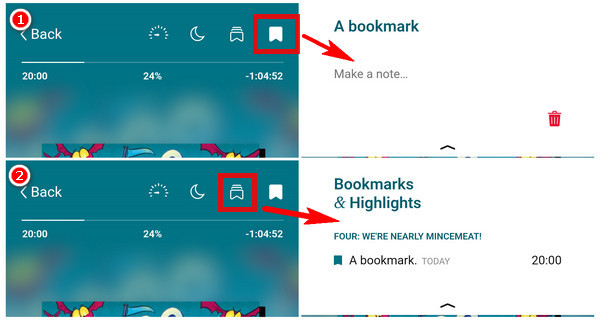
While listening to an audiobook, you can add bookmarks and write notes. This makes it easy to save meaningful quotes, mark your favorite moments, or jot down your thoughts so you can export and review them anytime.
Steps to add a bookmark: Tap the icon in Image 1 > Long-press the bookmark to make a note.
Steps to see all the bookmarks: Tap the icon in Image 2.
4. Rewinding or Fast-Forwarding ⏪⏩
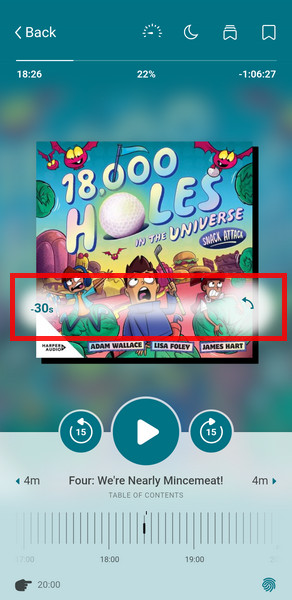
If you miss a part of your audiobook or accidentally skip ahead, you can easily jump to a specific spot by dragging on the book cover. The further you swipe, the further you skip.
5. Skipping Between Chapters 📚
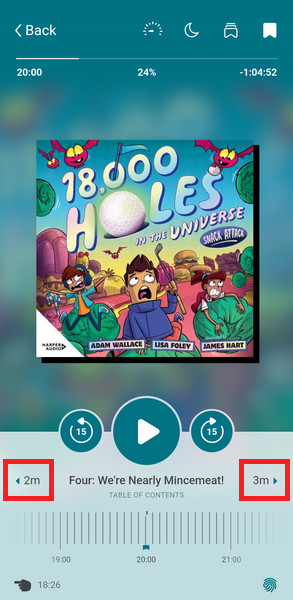
If a chapter starts with a long introduction or recap, you can use these two buttons to quickly jump to the next chapter or go back to the previous one, making it easier to control your playback progress.
6. Jump to Recently Played ↩️
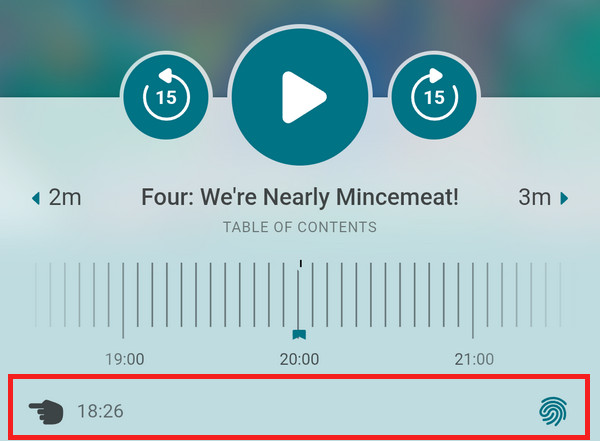
If you accidentally skip to another chapter and can't remember where you left off, this feature is incredibly helpful. It makes it easy to jump back to your previous listening spot without frustration.
Steps:
- Tap the "Hand" icon in the lower-left corner of the screen to jump to your last position.
- Tap the "Fingerprint" icon in the lower-right corner of the screen to see a list of your recent places.
Part 2: How to Listen to Audiobooks on Libby Offline?
To be honest, Libby is incredibly convenient for eBooks/audiobooks — free, easy to use, and packed with titles. But there's one catch: you're borrowing, not owning. When the loan expires, it's automatically returned. If you want to revisit it years later, you may have to queue up again — and there's no guarantee your library will still carry the title. Also, after waiting weeks, the book finally becomes available — but life gets busy, you forget to suspend the hold, and the loan period slips away. By the time you're ready, it's gone and you're back in line.
If you'd rather keep the titles you truly love, AnyLibro Converter lets you save borrowed Libby eBooks or audiobooks to your computer for personal use — no more loan limits, no more waitlists, and full freedom to transfer them to any device for offline listening or reading.
AnyLibro Converter
Steps to Download Libby Audiobooks
Step 1.Launch AnyLibro Converter on your computer. Next, click the search icon at the bottom. Add a library and log in with your library card credentials.
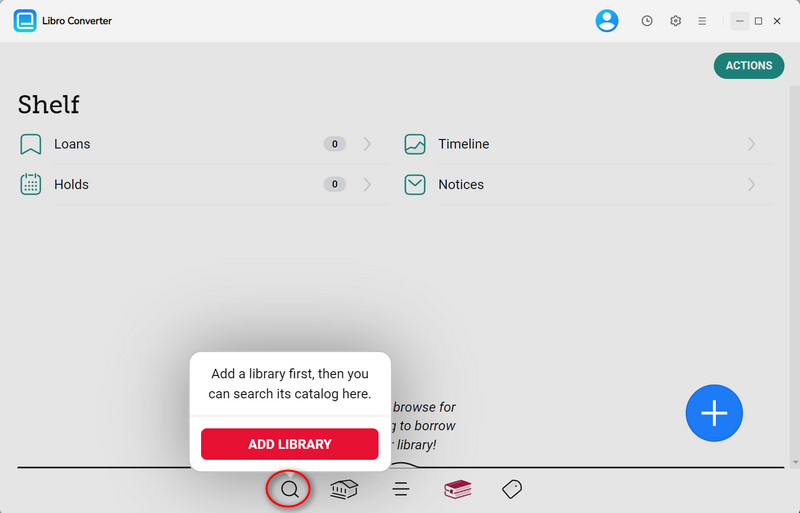
Step 2.Browse or search for the audiobooks you want to download.
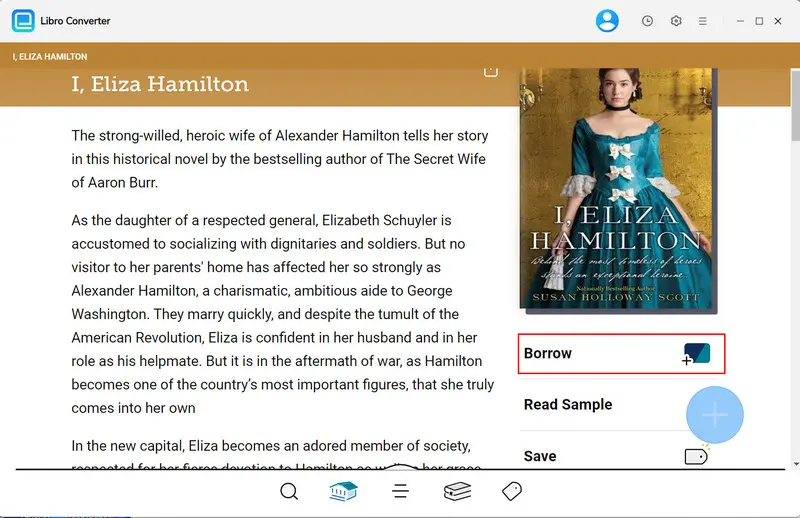
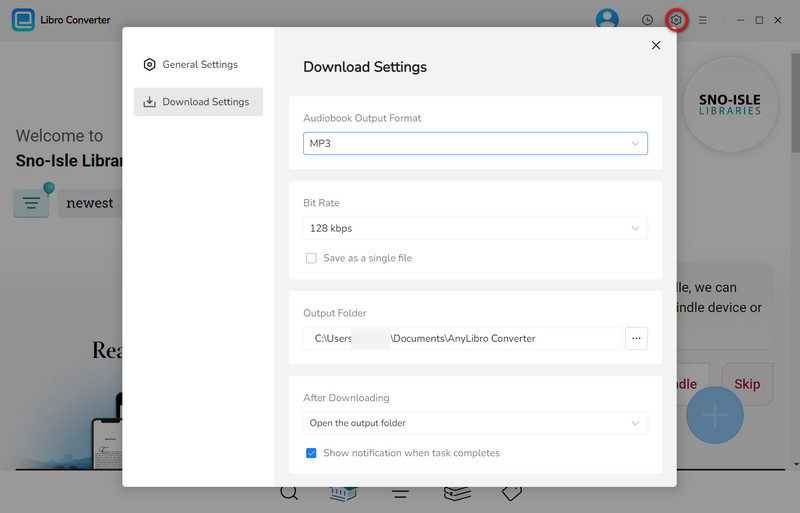
Step 3.Click the gear icon in the upper-right corner to open Settings. Choose the output format, bit rate and output folder as needed.
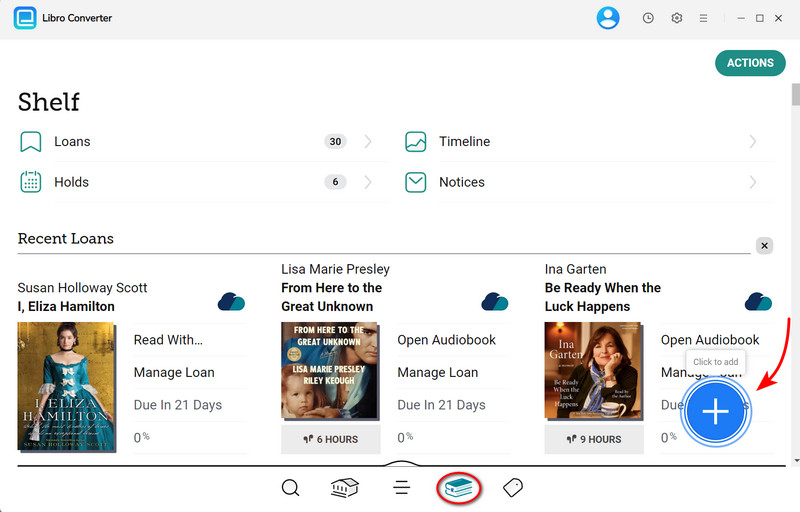
Step 4.Go to Shelf. Click the floating "+" button to add selected audiobooks to the conversion queue.
Step 5.Click the "Download" button to begin converting the audiobooks you choose.
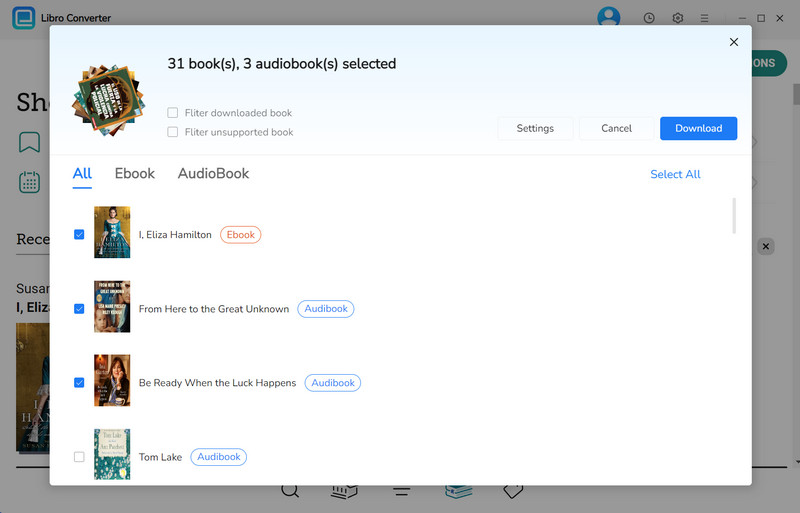
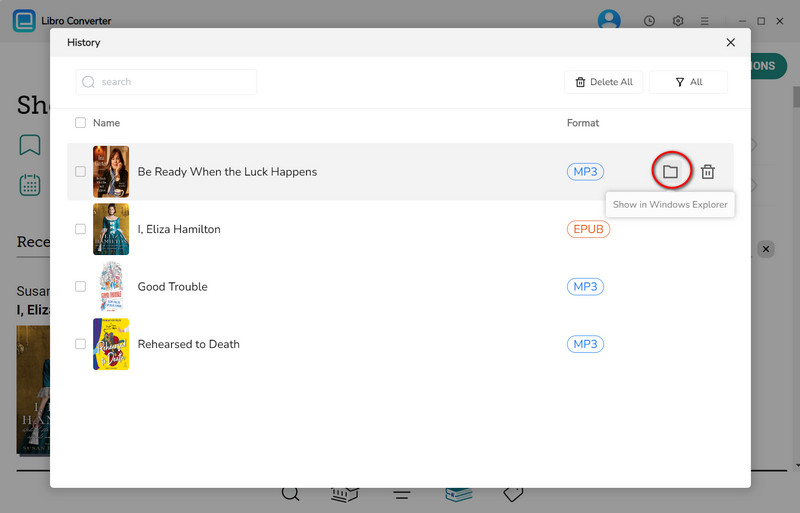
Step 6.Once conversion is complete, click the clock icon in the top-right corner to see finished downloads. Hover over a file and click the folder icon to open the output folder. Then, you can listen to libby audiobooks offline.
YouTube Video: How to Convert Libby Audiobooks to MP3
Part 3: FAQs about Libby Audiobooks
Q1: Why did my Libby audiobook disappear?
Here are the most common reasons:
- The loan expired and was automatically returned.
- The library removed the title from its collection.
- Account or sync issues.
Q2: How can I save or export my bookmarks before my Libby audiobook expires?
Once the loan expires, your bookmarks and notes are removed from your Shelf. If you borrow the same title again, your highlights and bookmarks may be restored in some cases.
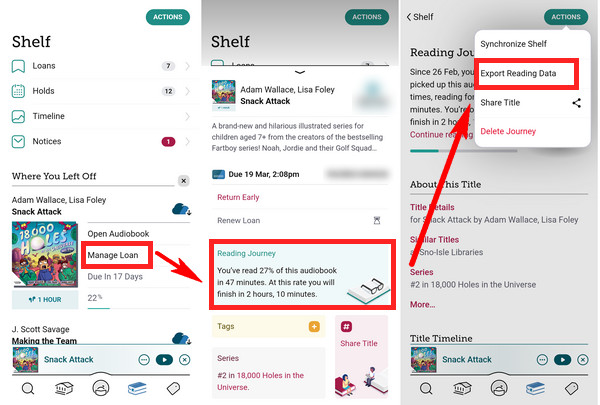
You can export them before the loan ends. (Go to "Shelf" > Tap "Manage Loan" > "Reading Journey" > Tap "Action" in the upper-right corner of the screen > "Export Reading Data".)
Tip: If you also want to export Libby audiobook or its metadata, check out our guide on how to export whole audiobooks: 👉 Best Libby Audiobook Exporters
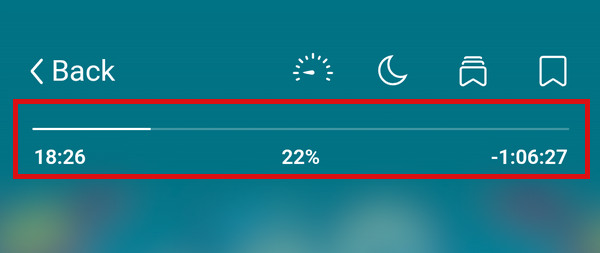
Q3: How can I check my listening progress?
Open the audiobook > At the top of the player screen, you'll see:
- Your current playback position
- The percentage completed
- The remaining listening time
Q4: Why are some chapters locked in a book?
1. You're listening to a sample: Samples only include a few chapters. To unlock the full audiobook, simply borrow the title.
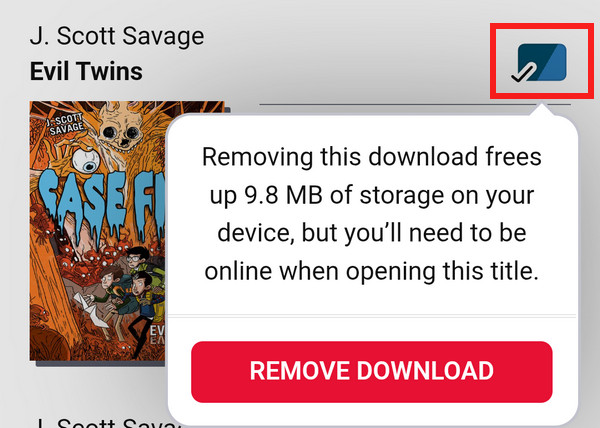
2. The download didn't sync properly: If you've already borrowed the audiobook but chapters are still locked, try this: Remove the download > Close the Libby app completely > Reopen the app > Download the audiobook again.
Q5: Can I listen to Libby audiobooks on my Kindle or MP3 player?
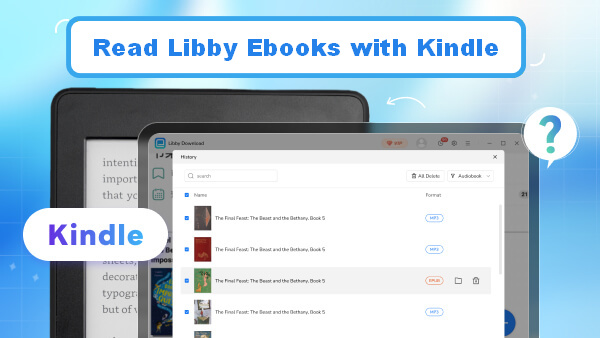
For Kindle: Kindle devices are designed for reading eBooks, not for playing Libby audiobooks. If you borrow an eBook through Libby, you can send it to your Kindle for reading.
For MP3 players: Libby audiobooks cannot be directly transferred to traditional MP3 players. You can convert the audiobook files with AnyLibro Converter.
The End
By now, you've discovered the 6 essential Libby audiobook features. Why not open one and try out these features now? If you'd like to play your audiobooks on other devices or simply want more control over how and when you listen, don't miss out on AnyLibro Converter. With just a few clicks, you can download your audiobooks to your computer and enjoy them anytime — even without an internet connection.
Better yet, you won't have to deal with long hold times. No more waiting weeks or even months just to continue a story you're excited about.
Note: During the trial version, you can only convert and save the first 20% of each book. To unlock full access and convert entire books, you’ll need the full version.

Clara Whitman
Clara specializes in creating practical guides for book lovers and digital reading tools.
With years of experience exploring apps like Libby, Kindle, and Audible, she shares clear, step-by-step tips to help readers get the most out of their eBooks and audiobooks.

 Libby Audiobook Converter
 All-In-One Music Converter
 Spotify Music Converter
 Apple Music Converter
 YouTube Music Converter
 Amazon Music Converter
 Tidal Music Converter
 Streaming Music Recorder
 Photo Enhancer AI
 Video Enhancer AI
 Audible Audiobook Converter