

Libby Vs Hoopla: Which Is Better for Audiobooks in 2026
In 2026, Libby and Hoopla are two of the top apps for borrowing audiobooks. But which one is actually better? Both offer free access to thousands of titles, but they differ in catalog size, borrowing process, wait times, and offline features. This comparison will help you quickly decide which app fits your audiobook listening needs.
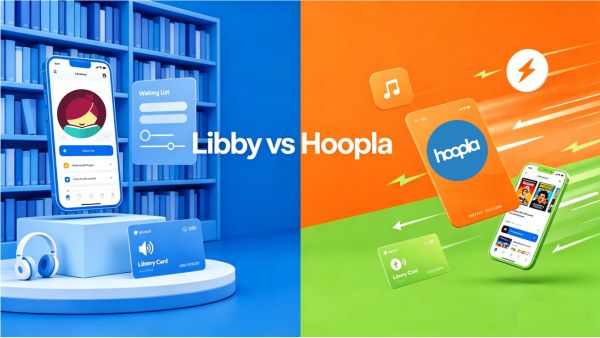
Libby vs Hoopla: Key Differences at a Glance
Before diving deeper, here’s the big picture of Libby vs Hoopla audiobooks. Both Libby and Hoopla connect you to your local library’s digital collection, but they use very different access models.
| Feature | Libby (OverDrive) | Hoopla Digital |
|---|---|---|
| Borrowing Model | Waitlist-based (library copy system) | Instant access (on-demand borrowing) |
| Wait Times | Often days to weeks for popular titles | No wait time |
| Monthly Limits | Commonly 10–20 items | Usually 3–10 items |
| Best For | Bestsellers, new releases | Backlist titles, comics, music |
| Kindle Support | Available in US libraries | Not supported |
| Loan Period | 7–21 days | Usually 21 days |
| Ownership | Borrow only | Borrow only |
| Access Style (2026 reality) | Limited copies → possible queues | Budget-based instant borrowing |
💡 User Experience: In practice, most users don’t rely on just one app:
Libby is better for planning ahead and reserving popular or newly released audiobooks
Hoopla is better for instant listening when you want something right away.
Libby vs Hoopla Cost & Borrowing Differences
Both Libby and Hoopla are free to use with a library card, but they operate on fundamentally different models. Understanding these differences can help you decide which app to try first for your next audiobook.
Libby: The “Digital Bookshelf” (Limited Copies)
Libby works like a traditional library system. Each audiobook has a limited number of digital copies owned by your library, so availability is shared.
- If all copies are in use, you must join a waitlist.
- Once available, you get a fixed loan period (usually 7–21 days).
- Popular titles can involve long waits due to limited licensing.
👉 In short: Libby = waitlists + limited copies
Hoopla: The “Instant Borrow” Model (No Copies)
Hoopla doesn’t use a copy system. If a title is in the catalog, it can be borrowed immediately by anyone.
- No waitlists at all.
- Borrow and listen instantly.
- Monthly borrowing limits apply depending on your library.
👉 In short: Hoopla = instant access + monthly limits
Libby vs Hoopla Audiobooks and Podcasts
If you’re searching for a specific title, the answer to Libby vs Hoopla audiobooks and podcasts depends mainly on one thing: whether the book is new, mainstream, or niche. In 2026, both catalogs are strong—but they serve very different purposes.
Libby: Best for Bestsellers and Mainstream Releases
Libby is curated by local libraries, which means its catalog focuses heavily on popular demand.
- Strongest selection of bestsellers and new releases.
- Covers major publishers and trending audiobooks.
- Includes magazines like The New Yorker and National Geographic (varies by library).
- Availability depends on library licensing and budgets.
- Lacks a dedicated podcast section, but some libraries offer podcasts through “Extras” like Ground News or learning plugins.
Hoopla: Stronger for Variety and Niche Content
Hoopla uses a centralized licensed catalog, giving it broader but different coverage.
- Large catalog of audiobooks plus movies, TV shows, and full music albums.
- Strong for classic, indie, and niche genres.
- Includes “BingePass” collections for bundled content access.
- Offers many popular podcasts as on-demand audiobooks, and some libraries provide a "Podcast BingePass" for unlimited 7-day access to select networks.
Which One Should You Check First?
| If you want... | Check Libby First | Check Hoopla First |
|---|---|---|
| A 2026 New Release | ✅ | ❌ |
| Classic Literature | ➖ | ✅ |
| Graphic Novels / Comics | ➖ | ✅ |
| Professional Courses | ❌ | ✅ |
| Podcast | ➖ | ✅ |
💡 Editor Experience: I always check Libby first for the hits. If the wait is longer than 4 weeks, I jump over to Hoopla. Hoopla is great for an all-in-one media experience, but if you use dedicated podcast apps like Spotify or Apple Podcasts, you likely won’t use either platform for regular podcast listening.
Libby vs Hoopla on Kindle and Playback Devices
In 2026, offline listening is essential—but how you download and where you can play audiobooks differs greatly between Libby vs Hoopla—especially when it comes to Kindle and other playback devices.
Both Libby and Hoopla support offline downloads, but neither allows true file portability.
Libby: Better Kindle and Device Support (But Still App-Restricted)
- Works on iOS, Android, and Fire tablets.
- Kindle support available for ebooks (US libraries only).
- Audiobooks must be played inside the Libby app.
- Downloads are tied to loan period and expire automatically.
- No PC/Mac offline playback.
Hoopla: Mobile-Only Playback, No Kindle Support
- Offline downloads available only on mobile devices.
- No desktop offline downloads (web is streaming-only).
- Downloads tied directly to monthly borrow limits (3–5 items typical).
- Content disappears once returned or loan period ends.
| Feature | Libby | Hoopla |
|---|---|---|
| Offline audiobooks | Yes (app only) | Yes (app only) |
| PC/Mac offline use | No | No |
| Kindle support | Yes (ebooks only) | No |
| Smartwatch support | Limited | Very limited |
| CarPlay / Android Auto | ✅ Yes | ✅ Yes |
| File ownership | No | No |
💡 Editor Experience: The biggest downside for me is that I can't put my library books on my Garmin watch for runs or my old-school MP3 player to save phone battery. This is why I started using AnyLibro Converter. It is a simple way to convert Libby audiobooks into MP3 files and ebooks into EPUB, so I can read or listen to Libby on Kindle, MP3 players, and more—completely offline and without app limitations.
Libby vs Hoopla Wait Times Compared
If your priority is instant access, then Hoopla is generally faster than Libby—but in 2026, “fast” comes with a few important limits.
Hoopla: Instant Access (with Limits)
- No holds or queues.
- Instant borrowing for available titles.
- Monthly borrow limits apply (often 3–5 items).
- 2026 daily borrowing caps may pause borrowing once library budget is reached.
Libby: Slower but More Predictable
- Popular audiobooks often have 12–24 week wait times.
- Hold limit reduced to around 10 titles per user.
- “Skip-the-Line” ☘️ titles offer immediate checkout but shorter loan periods.
Is Hoopla Faster Than Libby?
| Scenario | Winner | Why |
|---|---|---|
| New bestsellers | Libby | Even if you have to wait, it’s more likely to have the latest popular audiobooks. |
| Last-minute trips | Hoopla | You can borrow instantly in seconds if you still have monthly credits. |
| Older or niche titles | Hoopla | These are usually available immediately without waiting. |
Libby vs Hoopla Limitations and Downside
While Libby and Hoopla are great for free audiobooks, both platforms come with important limitations that affect how you use content in 2026.
Libby Limitations
- You cannot keep Libby audiobooks permanently (they expire after the loan period).
- Popular titles often require long waitlists.
- Limited by your library’s available digital copies.
- No export to MP3 or external devices.
Hoopla Limitations
- Monthly borrowing limits (typically 3–5 items).
- Some libraries also enforce daily borrowing caps.
- No permanent ownership of content.
- Downloads only work inside the app.
Libby Extra Tip: How to Keep Your Libby Audiobooks Longer & Forever
The Libby app’s official "Download" button is handy for quick listening, but there’s a catch—it’s just a rental with a countdown. Whether it’s a 7-day loan or a 21-day borrow, the file disappears once your time’s up. If you’re in the middle of a long audiobook or want to listen on devices like a Garmin watch or a classic MP3 player, you need a way to break free from the app.
This is where AnyLibro truly stands out. As the top Libby audiobook exporter in 2026, AnyLibro makes it simple to convert your borrowed Libby titles into MP3, M4A, or M4B files. It preserves the original audio quality and chapter structure. You can then play them on any audiobook player, transfer them to a USB drive for your car, or even convert Libby eBooks for reading on ereader like Kindle—all without being tied to a single app.
AnyLibro Converter
How to Download Libby Audiobooks to MP3
Step 1. Download and install AnyLibro Converter on your computer. Open the app and click the search icon at the bottom. Enter the name of your local library and log in using your library card details.
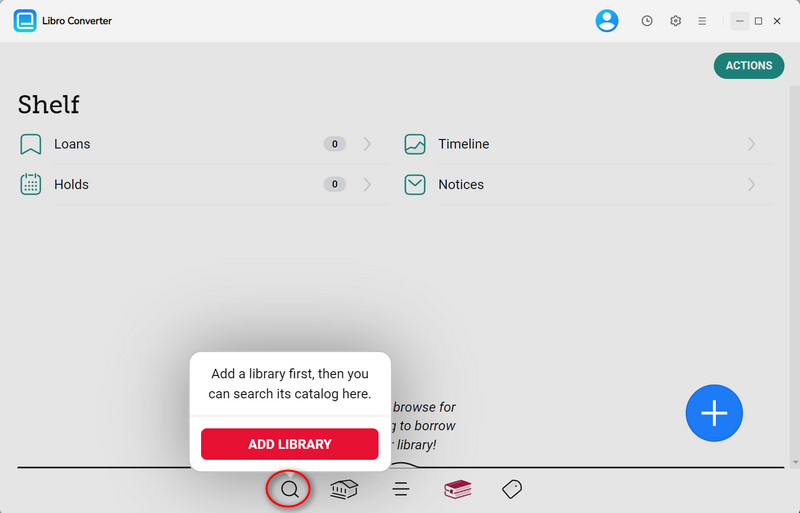
Step 2. Search for the Libby audiobooks you want to download, then add them to your Loan list.
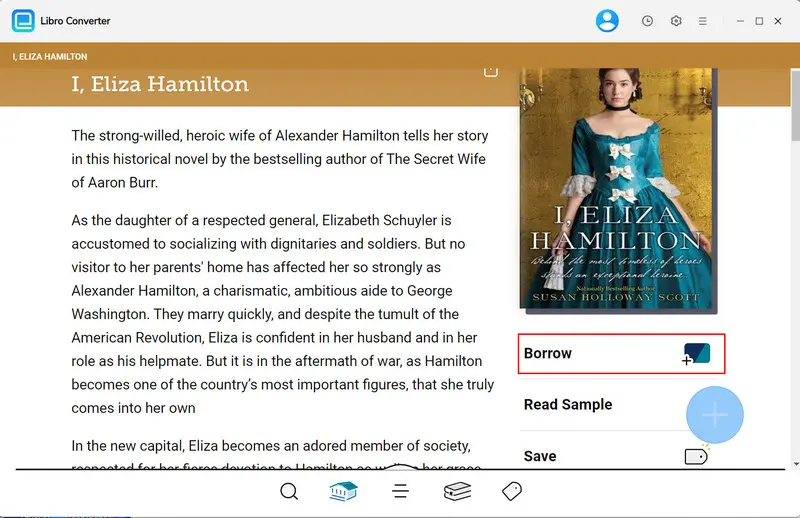
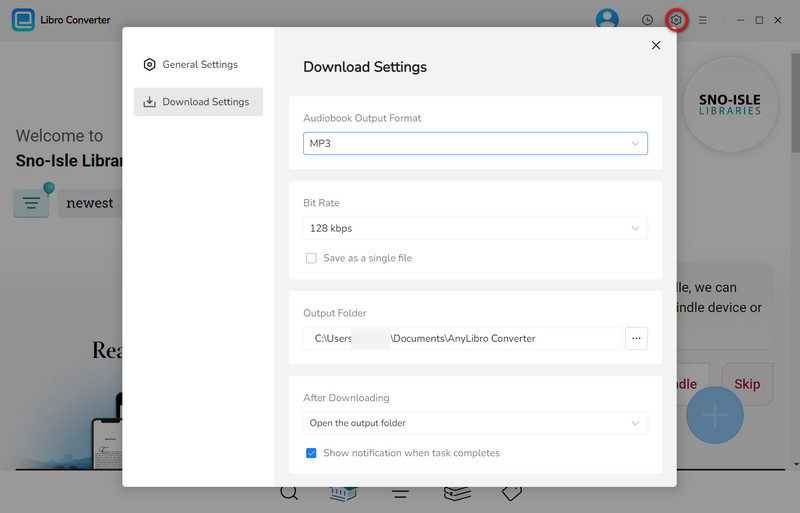
Step 3. Click the gear icon in the upper-right corner to open Settings. Select MP3 as the output format, and adjust options like bit rate and output folder as needed.
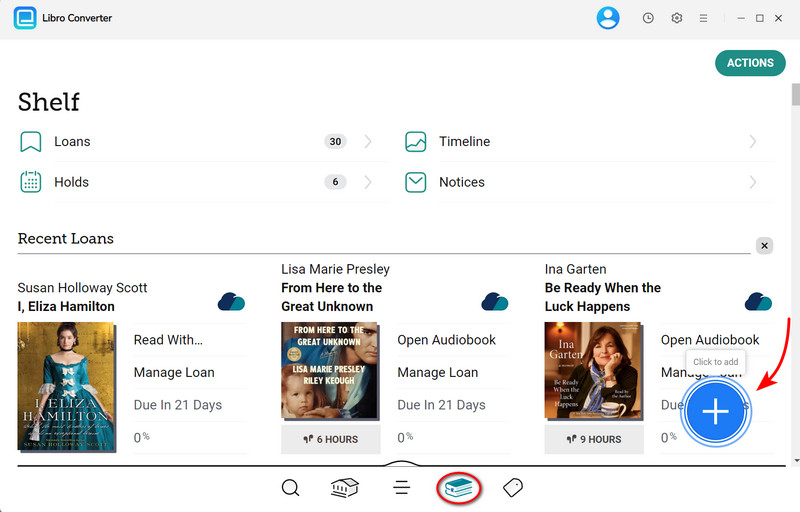
Step 4. Click the book icon to go to your bookshelf. Then, click the floating “+” button to add audiobooks to the conversion queue.
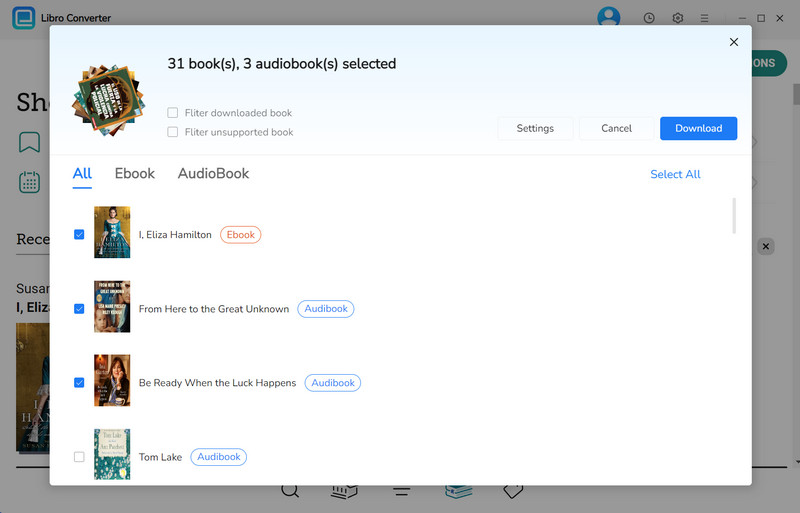
Step 5. Click the “Download” button to start converting your audiobooks.
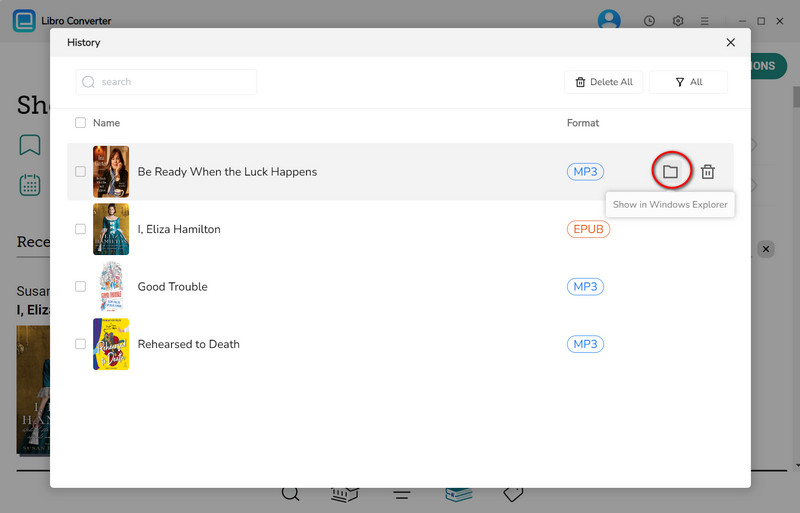
Step 6. When conversion is complete, click the clock icon in the upper-right corner to see your finished audiobooks. Hover over any audiobook and click the folder icon to open the output folder. Now you can play them to any device, whether that's an MP3 player, smartphone, iPad, Alexa, etc.
FAQs About Libby vs Hoopla
Q1: Can I use both Libby and Hoopla at the same time?
A: Yes. Many users use both Libby and Hoopla together. Libby is usually used for bestsellers and planned reading, while Hoopla is used for instant access content.
Q2: Libby vs Hoopla vs OverDrive: What’s the difference?
A: Libby is the modern app built by OverDrive for library borrowing. OverDrive is the older platform, while Libby is its updated user interface. Hoopla is a separate digital media service with a different borrowing system and catalog.
Q3: Libby vs Hoopla vs Kanopy — how do they compare?
A: Libby focuses on ebooks and audiobooks. Hoopla offers audiobooks plus movies, music, and comics. Kanopy is mainly a streaming platform for films and documentaries, also accessed through libraries.
Q4: Why are libraries discontinuing Hoopla?
A: Some libraries are reducing or adjusting Hoopla usage due to per-borrow licensing costs. Since libraries pay each time a title is borrowed, high usage can create budget pressure, leading some systems to limit or replace it with other services.
Q5: Can I keep Libby or Hoopla audiobooks forever?
A: No. Both Libby and Hoopla only offer temporary access, and the books expire after the loan period.
If you want to keep them longer, some users use tools like AnyLibro Converter to save Libby audiobooks as MP3 or M4B files so they can listen anytime without worrying about expiration.
Final Verdict: Libby vs Hoopla – Which Is Better for You?
There is no clear winner in Libby vs Hoopla—it depends on what you want. Libby is better for bestsellers and new releases, but you may need to wait. Hoopla is better for instant access, but it has monthly limits.
Whatever app you choose, you’re still limited by the 21-day Libby borrowing period. That’s why some users turn to AnyLibro Converter to convert Libby audiobooks into MP3 or M4B files, so they can keep their audiobooks after they expire and listen freely on different devices instead of being locked inside one app.
Note: During the trial version, you can only convert and save the first 20% of each book. To unlock full access and convert entire books, you’ll need the full version.

Clara Whitman
Clara specializes in creating practical guides for book lovers and digital reading tools.
With years of experience exploring apps like Libby, Kindle, and Audible, she shares clear, step-by-step tips to help readers get the most out of their eBooks and audiobooks.
 Libby Audiobook Converter
 All-In-One Music Converter
 Spotify Music Converter
 Apple Music Converter
 YouTube Music Converter
 Amazon Music Converter
 Tidal Music Converter
 Streaming Music Recorder
 Photo Enhancer AI
 Video Enhancer AI
 Audible Audiobook Converter