

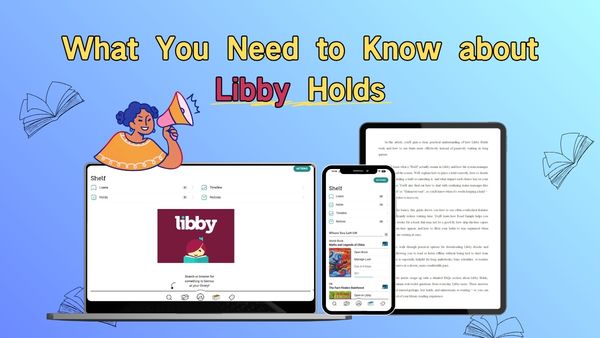
What You Need to Know about Libby Holds
Are you really familiar with Libby Holds while using the app?
As a leading digital borrowing platform, Libby has become a go-to app for readers who want easy access to their local library's eBook and audiobook collections. But are you really familiar with Libby Holds while using the app? Many users place holds without fully understanding wait times, delivery options, or how features like Suspend Hold affect their reading schedule.
In this guide, we'll break down what Libby Holds are, and share a practical tip to help you download Libby books — so you can enjoy your reading at your own pace.
Part 1: What Is a "Hold" in Libby?
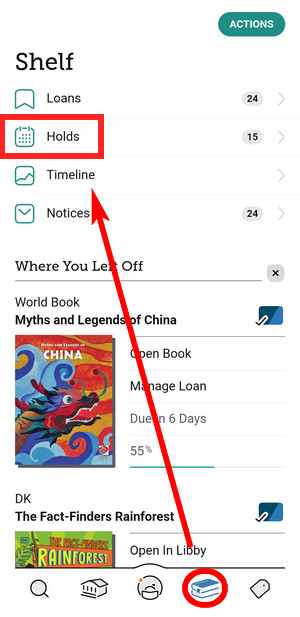
In the Libby app, "Hold" means you're reserving a digital copy of an eBook or audiobook that's currently checked out by other users. Since libraries have a limited number of digital copies, you'll need to Place Hold and wait your turn when all copies are in use. Think of it like joining a virtual waitlist at a library — Libby notifies you when it's your turn.
How to check your Holds: Tap "Shelf" icon at the bottom > Tap "Holds" at the top of the screen
Tip: When your hold becomes available, Libby will notify you and give you 3 days to decide whether to borrow, suspend or cancel it.
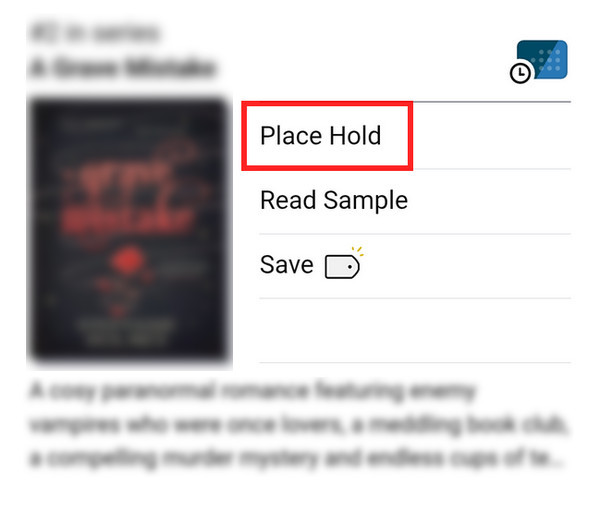
1. "Place Hold" 📌
If a book you want to read is currently unavailable — simply tap "Place Hold" to join the waitlist. After that, Libby will show your position in the queue, the estimated wait time, how many copies the library owns, and how many other readers are waiting for the same title.
Tip: Wait times are only estimates. If someone returns the book early, you may get access sooner. On the other hand, if the library removes copies or reduces availability, your wait time could become longer.
2. "Suspend Hold" and "Cancel Hold" ⏸️
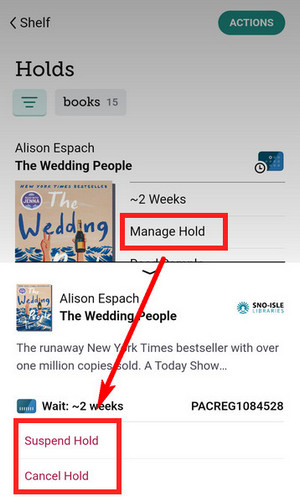
(1) Suspend Hold: If you want a book to arrive later, but don't want to lose your place in line.
(2) Cancel Hold: If you decide to remove a title from your Holds.
👉How to Suspend/Cancel Hold: Tap "Shelf" icon at the bottom > "Holds" > "Manage Hold" > "Suspend Hold / Cancel Hold".
Note: Once a hold is canceled, your original place in line is permanently lost. If you Place Hold again later, you'll have to start over at the end of the queue.
3. "Clean up hold" or "Unknown Wait" ⚠️
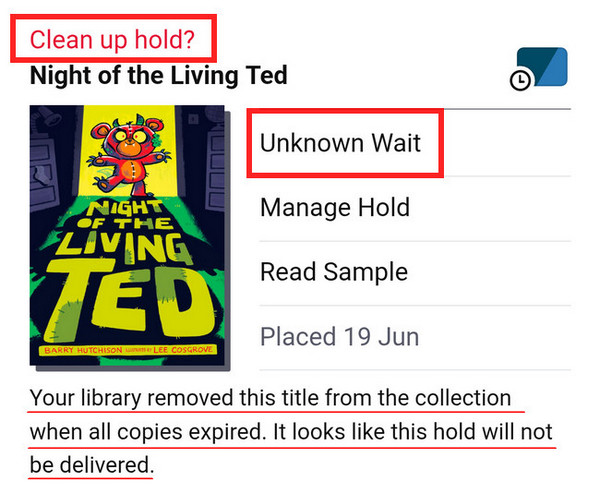
These messages usually mean the title is no longer available, often due to an expired license or because it has been temporarily removed from the library's collection. Since the book can't currently be borrowed, Libby isn't able to show an accurate wait time.
That said, this doesn't always mean the title is gone for good. If there's still demand from readers, the library may decide to repurchase or reinstate the title in the future. At this point, you can choose to:
- (1) Keep the hold, in case the title becomes available again.
- (2) Tap the red "Clean Up Hold" option to remove it from your Holds.
4. "Read/Play Sample" 📖
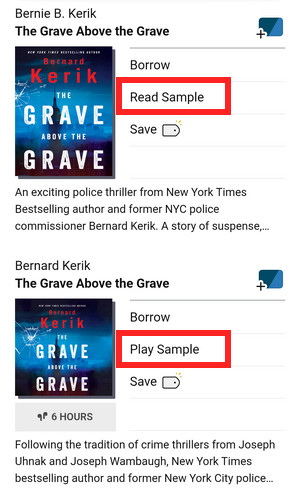
Before placing a hold in Libby, it's a good idea to try a sample first.
For eBooks, samples usually include the first few chapters. For audiobooks, you'll typically get 10–15 minutes of listening time. This lets you quickly decide whether the writing style, pacing, or narrator works for you — helping you avoid waiting weeks or longer for a book you might not even enjoy.
👉How to Read/Play Sample: Tap "Search" icon at the bottom > Search for a book > Tap "Read Sample" or "Play Sample"
5. "skip-the-line" Copy 🍀
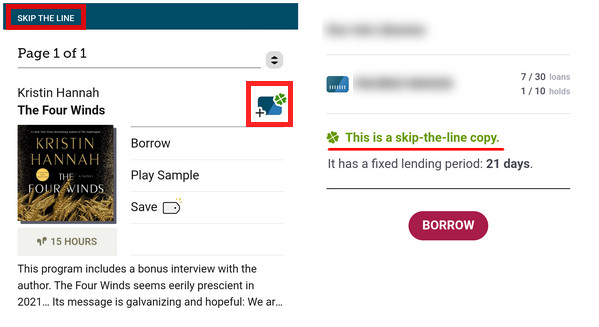
Some libraries offer "skip-the-line" copies for popular titles. These are special, limited-time copies that are available to borrow instantly — no holds, no waiting. In Libby, if you see a clover icon next to a book title, it indicates that this book is a "skip-the-line" copy. But you should note the following things before reading them:
- No hold required: "skip-the-line" copies can be borrowed immediately without joining a waitlist.
- No renewals: Once the loan period ends, borrowing periods cannot be extended.
- Shorter loan periods: Some libraries assign a shorter borrowing window, such as 7 days or less.
- Borrowing limits: Libraries may limit how many "skip-the-line" titles you can borrow at the same time.
👉How to find "skip-the-line" Copy: Tap "Search" icon at the bottom > "skip the line"
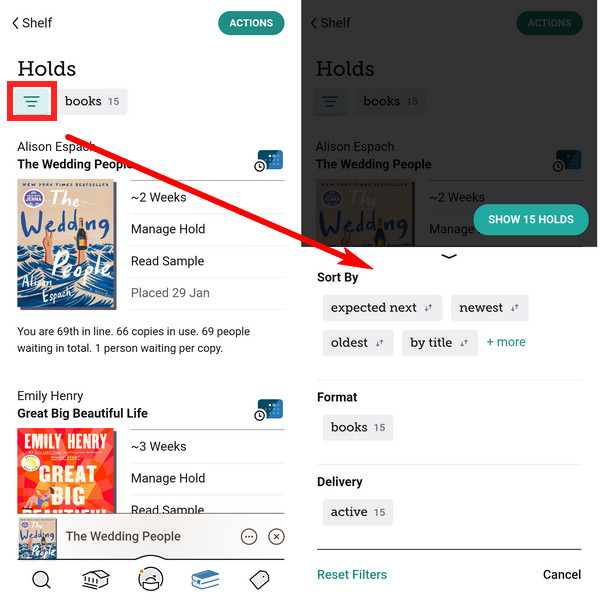
6. Filter Your Holds ☰
If you've placed a lot of holds, the Filter feature is something you shouldn't overlook. It helps you keep track of upcoming holds, so you don't miss them — or end up rushing through multiple books that become available at the same time.
👉How to filter your Holds: Tap "Shelf" icon at the bottom > "Holds" > Tap the "Filter" icon in the top-left corner
Part 2: What to Do When Libby Holds Take Too Long?
There's no doubt that Libby is incredibly helpful. It lets you borrow eBooks and audiobooks for free, without ever stepping into a physical library. However, Libby does come with one unavoidable limitation: everything is time-limited. In most cases, loans last up to 21 days. If you travel for work, get busy with life, or simply read at a slower pace, there's a good chance your loan will expire before you're finished. And if it's a popular title you waited weeks to borrow, you may have to place another hold and wait all over again.
That's why some users choose to use a Libby downloader like AnyLibro Converter as a workaround. It allows you to download Libby audiobooks or eBooks into local files for personal offline use, helping you take the pressure off strict loan deadlines. For readers who want longer access to their titles or prefer using multiple devices, this can be an alternative option.
AnyLibro Converter
How to Download Libby Books via AnyLibro
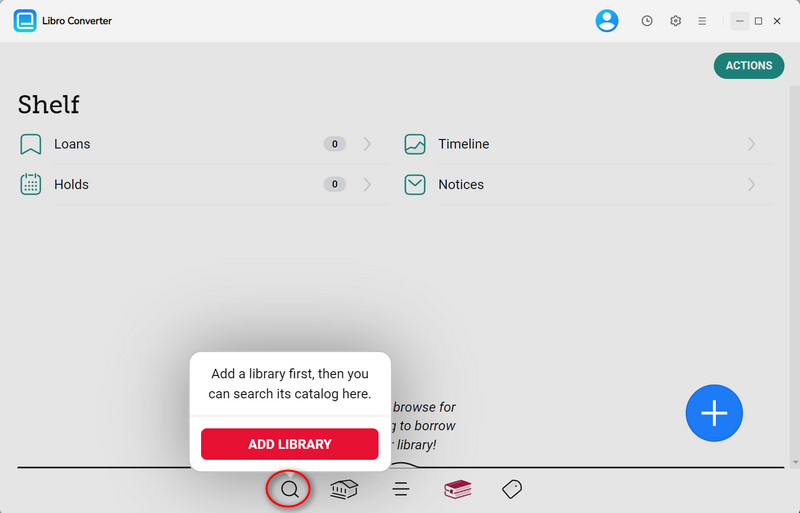
Step 1.Log in with Your Library Card
Download and launch AnyLibro, then click the Search icon at the bottom of the screen. Next, log in with your library card credentials.
Step 2.Borrow the Books You Want
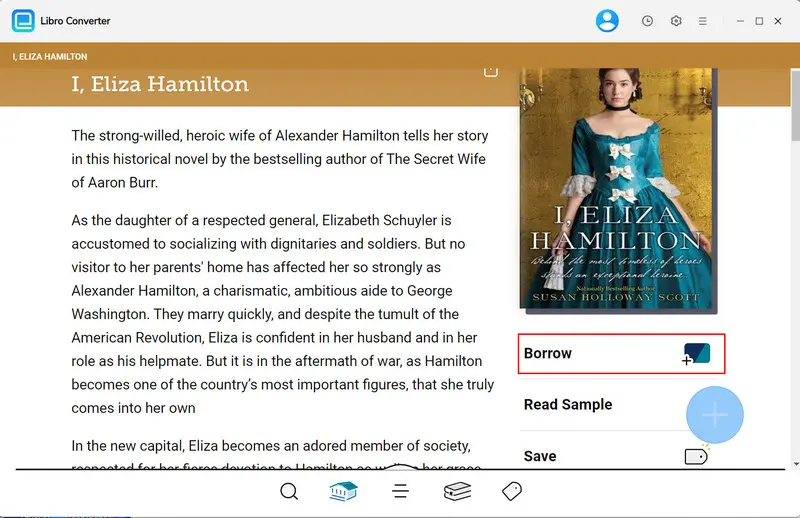
Browse or search for the eBooks/audiobooks you want to download, then add them to your Loan.
Tip: If you've reached your loan limit, return an old book first to free up a slot for your new download.
Step 3.Set the Output Format
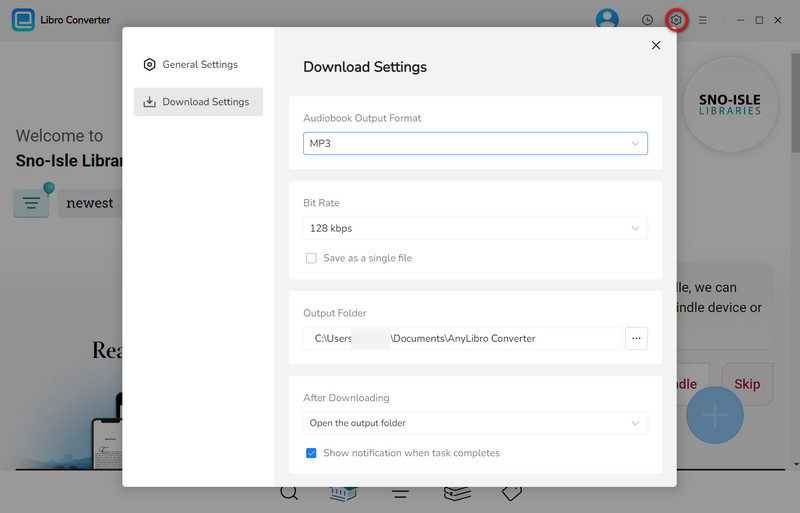
Before downloading, click the Gear icon in the upper-right corner to open Settings. Choose the output format, bit rate and output folder as needed.
Step 4.Add the eBooks and Audiobooks
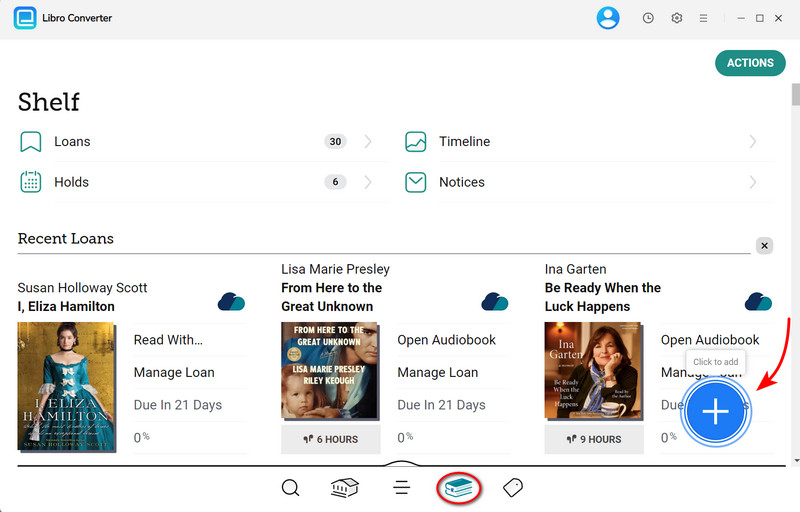
Click the Books icon to navigate to your Shelf. Then click the floating "+" button in the lower-right corner to add the eBooks/audiobooks to the conversion queue.
Step 5.Download the eBooks and Audiobooks
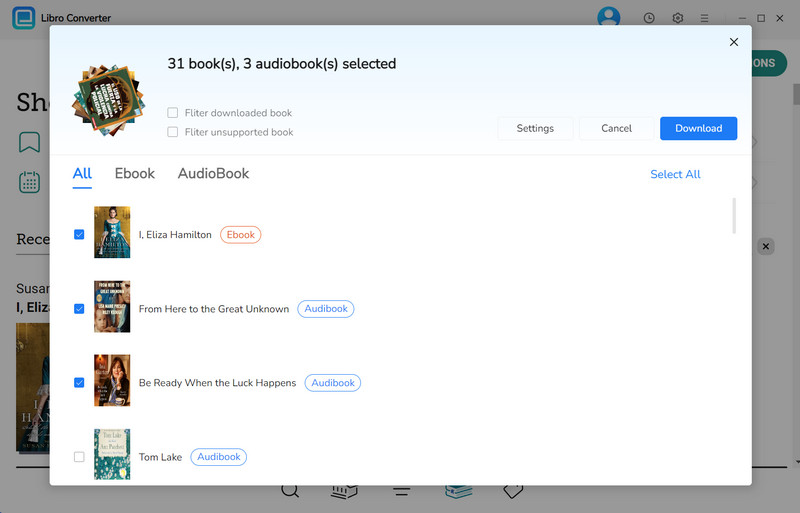
Click the "Download" button to begin converting these eBooks/audiobooks you choose.
Step 6.Find Your Permanent Audiobooks
Once conversion is complete, click the clock icon in the top-right corner to see finished downloads. Hover over a file and click the folder icon to open the output folder.
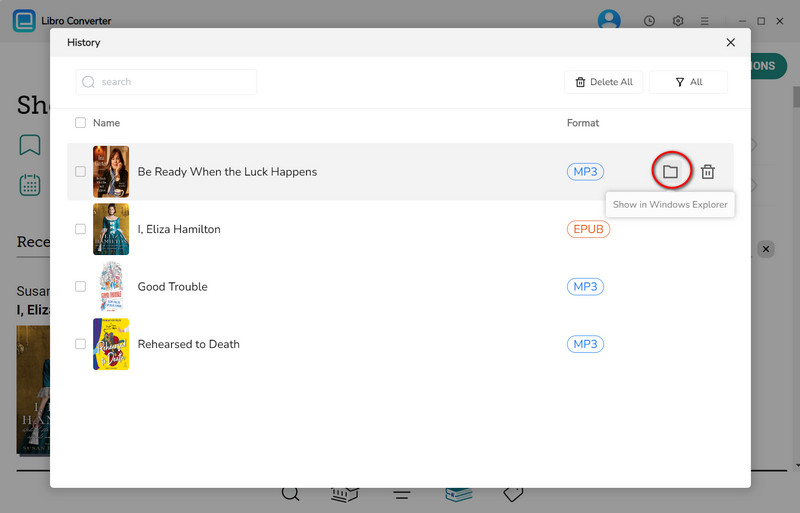
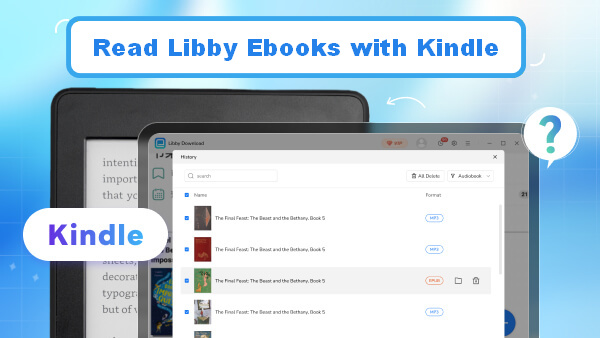
Once you've located your downloaded eBooks or audiobooks, you can transfer them to other devices for reading or listening — such as e-readers like Kindle, Kobo, or even store them on a USB flash drive for backup.
YouTube Video: How to Convert Libby eBooks to EPUB
Part 3: FAQs about Libby Holds
Q1: Why did some of my holds disappear?
This usually happens for one of these reasons:
- The library removed the eBook or audiobook license
- Your hold was suspended for too long (over 365 days)
- Your library card expired or became inactive
- The library made system or catalog changes
- Temporary syncing issues between Libby and the library system
- The hold was accidentally cancelled
Try searching for the title again in Libby, check whether your library card is still active, or contact your library's support team for confirmation.
Q2: How many holds can I place in Libby?
It depends on your library's policy. Most public libraries allow between 5 and 15 holds per library card. If you've added multiple library cards, each library has its own hold limit — meaning you can place more holds overall across different libraries.
How to check hold limits for each card: Tap "Menu" icon at the bottom > "Manage Cards"
Q3: Can I suspend and unsuspend a hold multiple times?
Yes. You can suspend and unsuspend a hold as many times as you like. However, if a hold is continuously suspended for 365 days, it will automatically expire and be removed from your Holds.
Q4: Can I manage loans and holds across multiple libraries in Libby?
Yes. Libby lets you add multiple library cards and manage everything in one place. You can view all your loans and holds across different libraries without switching accounts.
Q5: Can I read Libby samples on Kindle?
No. You can only read samples inside the Libby app. To read a book on Kindle, you must first borrow the full title.
If Kindle is supported, go to: Tap "Shelf" icon at the bottom > "Loans" > "Manage Loan" > "Read With..."
Q6: Can I move a hold to another library card?
No. Holds are tied to the specific library card used when placing them. If another library has shorter wait times, you'll need to place a new hold with that library separately.
The End
By now, you should have a solid understanding of how Libby Holds work and how its features can improve your reading experience. By managing holds and waitlists, and options like suspend hold effectively, you can find available copies faster and significantly improve your overall reading experience.
That said, if you'd rather not be limited by Libby's borrowing periods and prefer to read at your own pace, AnyLibro Converter is well worth considering. As a practical Libby downloader, it gives you more flexibility over your borrowed titles — so there's no need to rush through a book or worry about returning it before you're finished. You stay in control of your reading schedule and enjoy every page without pressure.
Note: During the trial version, you can only convert and save the first 20% of each book. To unlock full access and convert entire books, you’ll need the full version.

Clara Whitman
Clara specializes in creating practical guides for book lovers and digital reading tools.
With years of experience exploring apps like Libby, Kindle, and Audible, she shares clear, step-by-step tips to help readers get the most out of their eBooks and audiobooks.

 Libby Audiobook Converter
 All-In-One Music Converter
 Spotify Music Converter
 Apple Music Converter
 YouTube Music Converter
 Amazon Music Converter
 Tidal Music Converter
 Streaming Music Recorder
 Photo Enhancer AI
 Video Enhancer AI
 Audible Audiobook Converter