


Libby Limits: How Many Books Can You Borrow or Hold at Once?
"You've reached your loans/holds limit."
If you've seen this message while using Libby, you're not alone. Since 2024, many major library systems worldwide have reduced their Libby borrow and hold limits — and these changes are still ongoing. That's why more users are starting to ask: how many books can I actually "Borrow" or "Place Hold" through my library?
In this guide, we'll break down Libby borrow and hold limits in simple terms, and share 7 practical workarounds to help you deal with these restrictions more effectively.
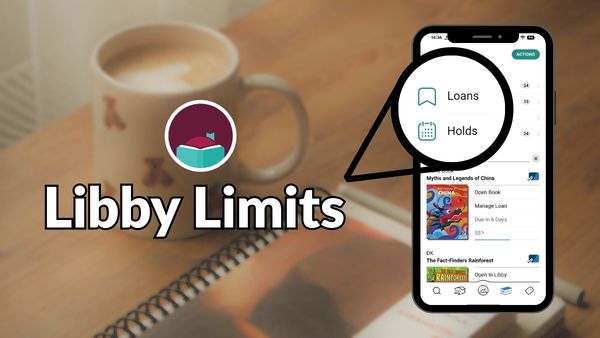
Part 1: What Are Libby Borrow & Hold Limits?
Libby limits refer to the maximum number of eBooks and audiobooks you can "Borrow" or "Place Hold" through your library in Libby. These limits are set by individual libraries to manage digital licensing costs and ensure fair access for all users.
There are two main types of limits:
- Libby borrow limits: the maximum number of titles (eBooks + audiobooks) you can "Borrow".
- Libby hold limits: the maximum number of titles (eBooks + audiobooks) you can "Place Hold".
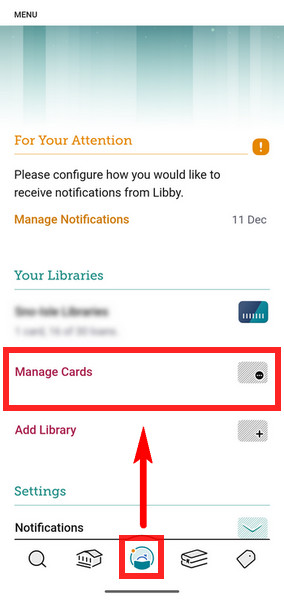
How to Check Your Libby Limits: Tap "Menu" > "Manage Cards" > Tap your library card.
Note: When you find a book and tap "Place Hold", it is added to your "Holds", and you're placed on a waiting list. Once a copy becomes available, Libby sends you a notification. You typically have about 72 hours to take action — "Borrow, Suspend, or Cancel Hold". Only after you choose to "Borrow" will it move to your "Loans".
Important Details You Should Know:
- Magazines: do NOT count toward borrow limits; No holds required.
- Skip-the-line:
- Counts toward borrow limits
- Does NOT count toward hold limits
- May have shorter loan periods (set by your library)
- May have a limit on the number you can borrow at one time (set by your library)
Tip: If you've reached your borrow limits, you can still read magazines, but can't borrow skip-the-line titles.
Example: Libby Limits in North America
| Library System | Borrow Limit | Hold Limit |
| New York Public Library | 3 | 3 |
| Sno-Isle Libraries | 30 | 10 |
| Toronto Public Library | 30 | 15 |
| Chicago Public Library | 10 | 5 |
| Seattle Public Library | 25 | 10 |
| Brooklyn Public Library | 20 | 10 |
| Queens Public Library | 20 | 10 |
| Austin Public Library | 10 | 7 |
| San Francisco Public Library | 25 | 15 |
| Carnegie Library of Pittsburgh | 10 | 10 |
Tip: Borrow and hold limits vary by library. Please check the Libby App to see how many titles you can "Borrow" or "Place Hold".
Part 2: How to Borrow More Books on Libby (7 Easy Tips)
Since these limits exist, there are also practical ways to work around them — so you can "Borrow" or "Place Hold" on more Libby titles. The following 7 methods may help you find the approach that works best for you.
1. Download Libby Books with AnyLibro Converter 👍
If Libby limits are slowing down your reading pace, you can use AnyLibro Converter to download borrowed titles for offline use. It supports converting eBooks to EPUB and audiobooks to MP3, M4A, or M4B.
This way, you can return books early to free up your "Loans" and "Holds". Even if a hold becomes available unexpectedly, you won't feel rushed to finish it in time.
AnyLibro Converter
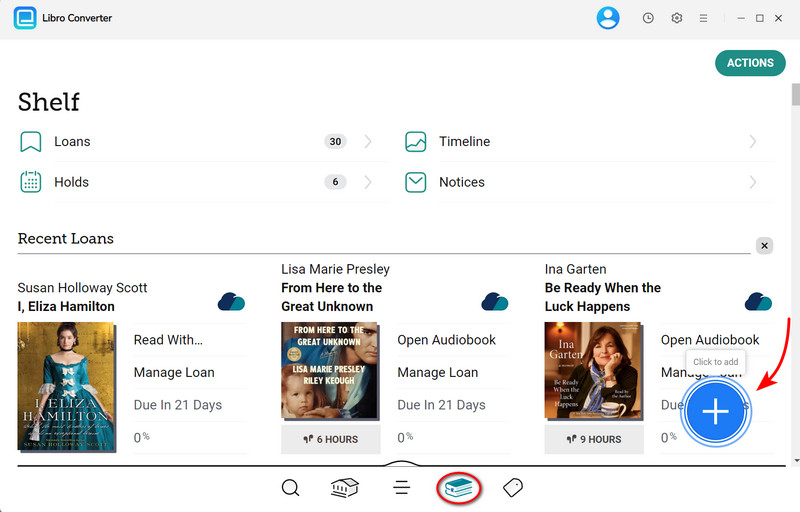
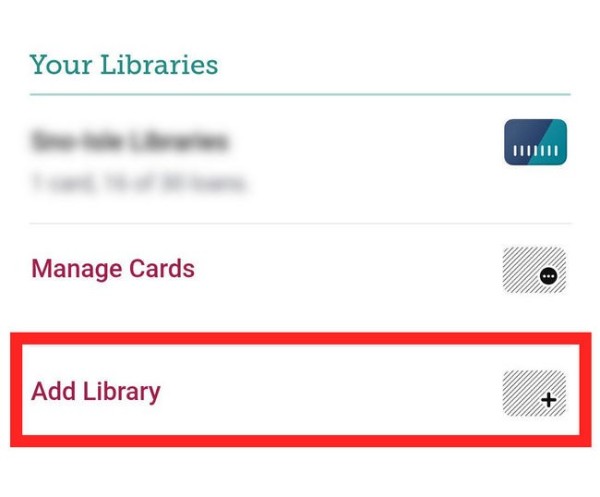
2. Add Multiple Library Cards 💳
This is one of the most common and effective methods. Each library card comes with its own borrow and hold limits, so adding more cards increases your overall access. Different libraries also have different collections, so a title unavailable in one system might be accessible in another.
Tip: Reciprocal Libraries — Some libraries allow you to access partner systems using your existing card.
Things You Need to Know about Reciprocal Libraries:
- No extra library card required.
- Access shared resources across partner libraries.
- Doesn't affect your home library's borrow or hold limits.
- Lower priority in waitlists compared to local cardholders.
- Most reciprocal programs don't allow holds — only items marked "Available" can be borrowed.
- Some high-demand new releases or exclusive titles may be unavailable to reciprocal users.
- Fewer borrow and hold limits overall.
3. Use "Skip-the-Line" Titles 🍀
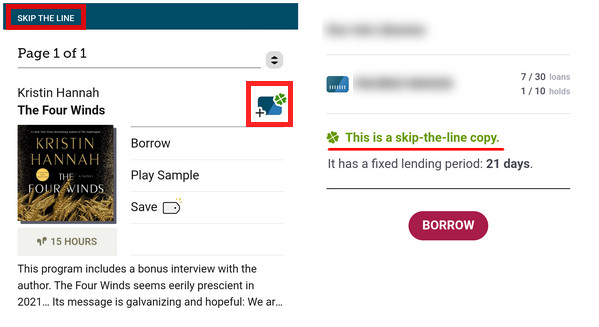
Many libraries offer "Skip-the-Line" titles (marked with a clover icon), which you can borrow instantly.
Things You Need to Know about "Skip-the-Line" Titles:
- No wait, borrow instantly
- Shorter loan period
- Cannot renew the loan
- Limited borrowing quantity
- Limited selection, fewer bestsellers
4. Use Tags to Manage Your Reading List 🏷️
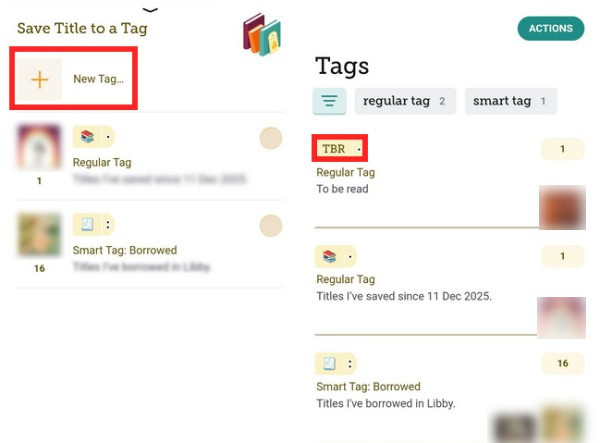
One of the main reasons people hit Libby hold limits is placing holds on every interesting book. This is unnecessary and inefficient.
A better approach is to use tags like "TBR" or "Interested" to organize your list without using hold slots. For titles not yet available, use the "Notify Me" tag so you'll be notified as soon as the library adds them. Then, only "Place Hold" when you're actually ready to read.
5. Use the "Available Now" Filter ☰
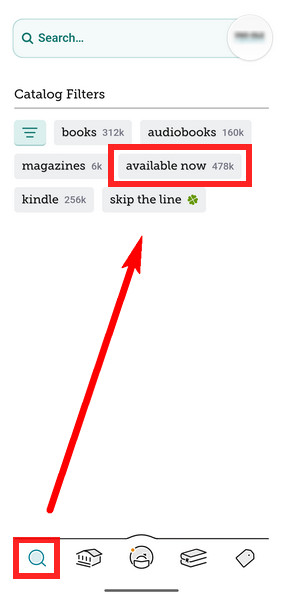
Instead of waiting in long hold queues, use the "Available Now" filter to find titles you can borrow immediately.
Things You Need to Know about "Available Now":
- No wait, borrow instantly
- Doesn't count toward your hold limits
- Great for discovering hidden gems
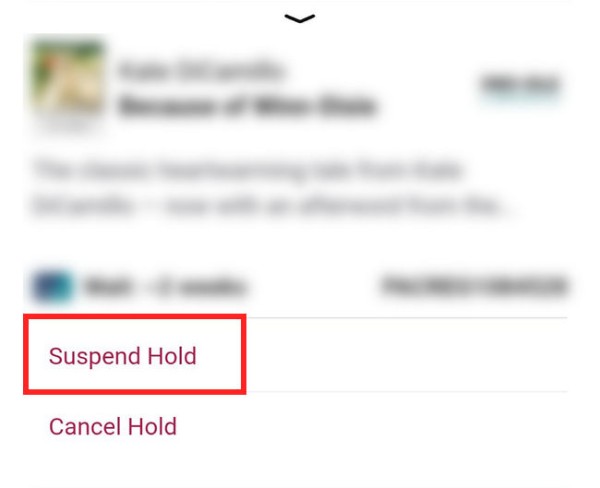
6. Use the "Suspend Hold" Feature ⏸️
If a hold becomes available but you're not ready to read, you can suspend it. Your place in line is preserved while the book goes to the next user.
Things You Need to Know about "Available Now":
- Can be suspended for up to 365 days
- Still counts toward your hold limits
- Pause or cancel a hold anytime, with no limits
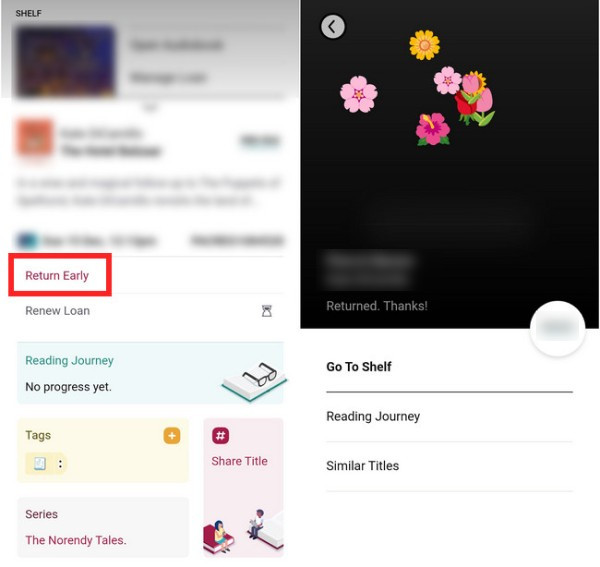
7. Return Early to Free Up Slots 🧹
Some users don't return books after finishing them and just wait for auto-return, which unnecessarily ties up their loan slots. Returning books early frees up your borrow limits so you can check out new titles sooner.
FAQs about Libby Limits
Q1. Can I increase Libby limits?
A: No. Libby limits are set by your local library and cannot be changed by users.
Q2. Why are Libby limits different across libraries?
A: Libby limits vary because each library manages its own digital collection and budget. Key factors include rising eBook and audiobook licensing costs, publisher restrictions, and differences in library funding.
Q3. Do magazines count toward Libby limits?
A: Usually no. In most library systems, magazines are not counted toward borrow limits, but this can vary depending on the library.
Q4. Why are Libby borrow limits usually higher than Libby hold limits?
A: In most cases, borrow limits are higher than hold limits to ensure more efficient use of library resources.
- Budget control: Libraries use hold ratio to decide whether to buy more copies. If hold limits are too high, waitlists can explode, forcing libraries to spend more on duplicate licenses instead of new titles.
- Shorter wait times: Lower hold limits encourage users to "Place Hold" only what they truly want, which helps keep queues shorter and titles moving faster between readers.
- Prevent backlog abuse: If holds are too generous, users may treat them like a wishlist — adding many titles at once. This leads to having no time to read or re-holds, reducing availability for others.
- Encourage available titles: Higher borrow limits allow users to enjoy multiple eBooks and audiobooks. Lower hold limits nudge readers toward titles that are immediately available, improving overall circulation.
Q5. Why can't I "Borrow" or "Place Hold" even though I haven't reached my limits?
A: Even if you haven't reached your borrow or hold limits, you may still be unable to "Borrow" or "Place Hold" due to the following common reasons:
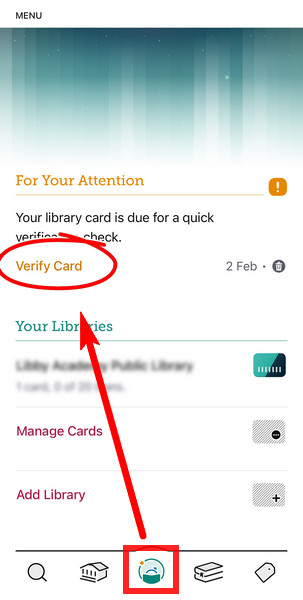
- Your library card needs to be verified again: Libby may occasionally ask you to sign in again to confirm that your library card is still valid.
- Fix: Go to "Menu" > Tap "Verify Card" > Sign in with your library card.
- Tips: If the issue persists, contact your library for further assistance.
- Your library card has expired: Most library cards need to be renewed every 1–2 years, often requiring proof of address. If your card has expired, you won't be able to "Borrow" or "Place Hold".
- Fix: Renew your library card either online or by visiting your local library.
- You're using a partner (reciprocal) library card: If you're using a reciprocal (non-resident) library card, some titles — especially popular or restricted ones — may not be available to you.
- Title availability or licensing limitations: Library eBooks are subject to licensing limits (such as a capped number of borrows or time-based access). In rare cases, a title may have just reached its limit or been removed, so it appears available but can't actually be borrowed.
Q6. Why do some books in Holds suddenly show "Unknown Wait"?
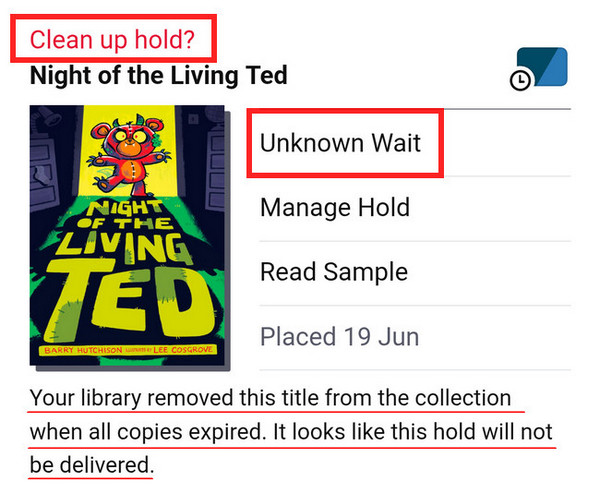
Possible reasons:
- The title is no longer available in your library: If the library's license for the book expires and they choose not to renew it, the title may be removed from the catalog. When this happens, all holds are automatically canceled, and the waitlist disappears.
- Publisher removes or relocates the title: Sometimes publishers withdraw books from platforms like Libby/OverDrive due to copyright changes, revised editions, or distribution shifts to other services.
- Library budget or collection changes: Libraries occasionally reduce or reorganize digital collections. Expensive or low-demand titles may be removed, which can also clear existing holds.
- Expired or invalid library card: If your library card is expired (often needs renewal every 1–3 years depending on the library), Libby may deactivate your account access and remove associated holds.
- Library system migration or catalog changes: When a library switches systems or joins a new consortium, hold data can sometimes be lost or reset during migration.
What you can do:
- Check your Timeline (Go to "Shelf" > Tap "Timeline"): Look for whether the hold ever existed. If you see the book marked as removed or missing, it confirms the library no longer provides it. If the icon shown in the image appears, it means your library has removed that book.
- Search the title again manually:
- If the book no longer appears > it has been fully removed from the library.
- If it still appears > it may be a temporary sync issue with your account (Please try contacting your library).
Wrapping It Up
By now, you should have a clearer understanding of Libby limits. It's a good idea to check your library's specific limits, so you know exactly what you're working with.
Among the 7 solutions we covered, there's likely one that fits your needs. That said, most of the other 6 are more like short-term fixes rather than long-term solutions. In comparison, AnyLibro Converter offers a more reliable and efficient way to manage and make the most of your borrowed eBooks. Try using AnyLibro to download your Libby books today, free up your borrowing slots, and enjoy greater flexibility in what you read next.
Note: During the trial version, you can only convert and save the first 20% of each book. To unlock full access and convert entire books, you’ll need the full version.

Clara Whitman
Clara specializes in creating practical guides for book lovers and digital reading tools.
With years of experience exploring apps like Libby, Kindle, and Audible, she shares clear, step-by-step tips to help readers get the most out of their eBooks and audiobooks.
 Libby Audiobook Converter
 All-In-One Music Converter
 Spotify Music Converter
 Apple Music Converter
 YouTube Music Converter
 Amazon Music Converter
 Tidal Music Converter
 Streaming Music Recorder
 Photo Enhancer AI
 Video Enhancer AI
 Audible Audiobook Converter
 Music Library Manager