


How to Download and Install Libby APK Safely [2026 Guide]
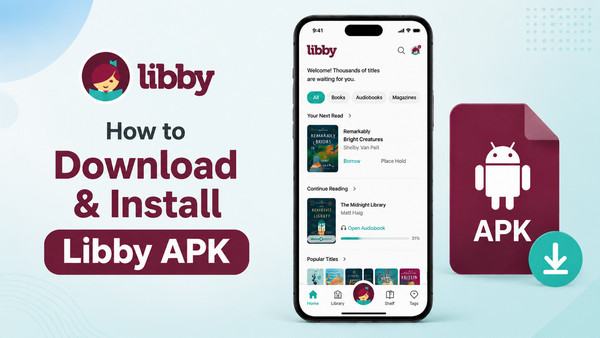
Libby—the free ebook & audiobook app that allows all bookworms to borrow and enjoy multiple library books at no cost. Typically, it is flexibly accessible via the website or the official app downloaded from the Amazon Appstore and Google Play. Aside from the app setup, users can get the alternative Libby APK installed on their Android. For this, the post offers step-by-step instructions, plus the tricky hack to keep Libby books on any device, forever.
Part 1: What is Libby APK? [Everything Explained]
A Quick Look
Simply put, Libby APK (Android Package Kit) is the install file for the Libby app on Android devices. It functionally the same as the official app. Plus, despite the APK tag, it is 100% safe and provided by Overdrive.
Why Do Some People Choose to Install Libby APK?
Being a manual installation route for Libby, Libby APK mostly helps users who want to sideload the app directly. Mainly exists for cases like the following:
Device Compatibility Difference Between the Libby App and the Libby APK?
| Feature | Libby App from the App Store | Official Libby APK |
| Android Phones | ✔️ (Android 7.1+) | ✔️ (Android 5+) |
| iPhone / iPad | ✔️ | ❌ |
| Windows / Mac | ✔️ (web browser) | ❌ |
| Amazon Fire Tablet | ✔️ (Fire HD 8 - Fire Max 11) | ✔️ (Fire OS 5 and above) |
| Official store install | ✔️ | ❌ (manual install) |
Is the Libby APK Safe? Official APK vs. Libby Mod APK
The Libby APK is not "a different version" but an alternative installation method provided by Libby itself. Still, unofficial versions, often called Libby mod APKs, are unverified and published by third-party websites. You should distinguish them with discretion.
| Feature | Official Libby APK | Libby Mod APK |
| Publisher | OverDrive (official) | Unknown source |
| Safety | Tested & verified | Risk of malware/spyware |
| Download Source | help.libbyapp.com | Third-party websites |
| Device Support | Fire OS 5+ supported | Unreliable compatibility |
| Free of charge | ✔️ | ❌ (Not 100% FREE-some mods have scam and need payment) |
| Regular updates | ✔️ | ❌ |
| Stable to use | ✔️ | ❌ |
| Account security | ✔️ | ❌ |
Note: Most Libby Mod APKs come from an unverified source, after all. They may contain malware, lack features, or even do harm to your device. It is advisable to use them with caution.
Part 2. How to Safely Download and Install Libby APK [Step-by-step Guide]
Now, take several steps to download and install Libby APK.
Download and Install Libby APK on Android/Fire Tablet
Step 1. Open your Android device (or Fire tablet), and just go to the Silk browser or Chrome.
Step 2. Type help.libbyapp.com/en-us/6279.htm, click on the red button "Download Libby APK". The file will begin downloading to your device.
Step 3. If your Android blocks it during the process (a message like: "Your device is not allowed to install apps from unknown sources", directly go to Settings and enable "Allow from this source".
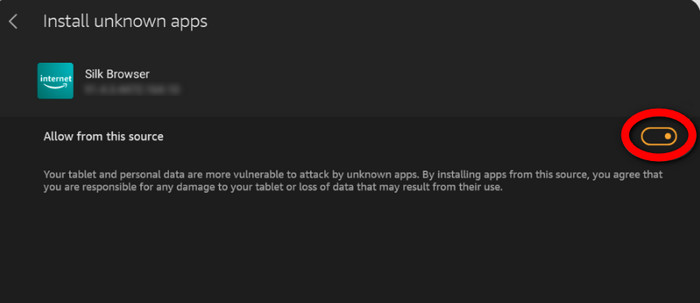
Step 4. Once downloaded, open the APK file and confirm "Install." You'll see a progress bar and then an "App installed" confirmation screen.
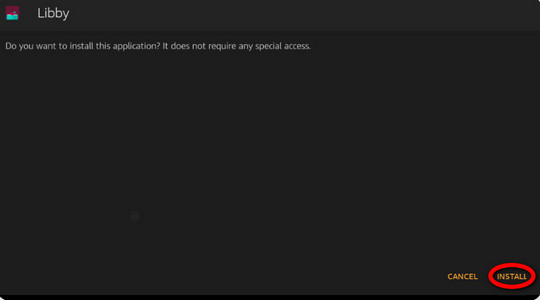
Success! You can launch the installed app, sign in to your Libby library, and start borrowing and enjoying your audiobooks.
Troubleshooting: Libby APK Won't Install?
Still cannot get the Libby APK to install? Here’s a quick breakdown with simple fixes:
Not Have Enough Storage to Install APK
Navigate to your device's Settings → Storage. Simply remove space by deleting unused apps, photos, or downloaded content.
Unable to Download Libby APK from Unknown Sources
Open Settings → Security (or Privacy on newer Fire OS) and find the designated Browser entry and enable "Allow from this source." Then attempt the installation again.
Fire OS Version Too Old
The Libby APK officially supports Fire OS 5 and above. If your device is on an older version, proceed with the system updates. Furthermore, the newer Fire tablet models now support direct installation through the app store. Just keep it on.
Corrupted Download APK Libby File
The APK file may not have downloaded completely. Delete the existing file from your Downloads folder and re-download it from the official OverDrive page using a stable Wi-Fi connection.
Bonus Tricks: Download Libby Books to Any Device with AnyLibro Converter🔥
Whether the Libby APK or the app delivers a seamless experience for all readers. But both come with catches. Your borrowed titles will be unavailable if the Libby loan expires. Plus, the books are only cached on the platform; you cannot move them between devices for permanent offline access. That's where AnyLibro Converter comes in.
AnyLibro Converter is aimed at exporting Libby audiobooks and e-books to MP3, M4A, M4B, or EPUB files in batches. It saves your borrowed Libby books forever- all preserved in high quality and with all metadata. With it, you can keep and read on any device—including e-readers, tablets, and others that don't even run the Libby app.
AnyLibro Converter
How to Download Libby Books for Offline Playback
Step 1. Get Your Libby Library Card Signed in
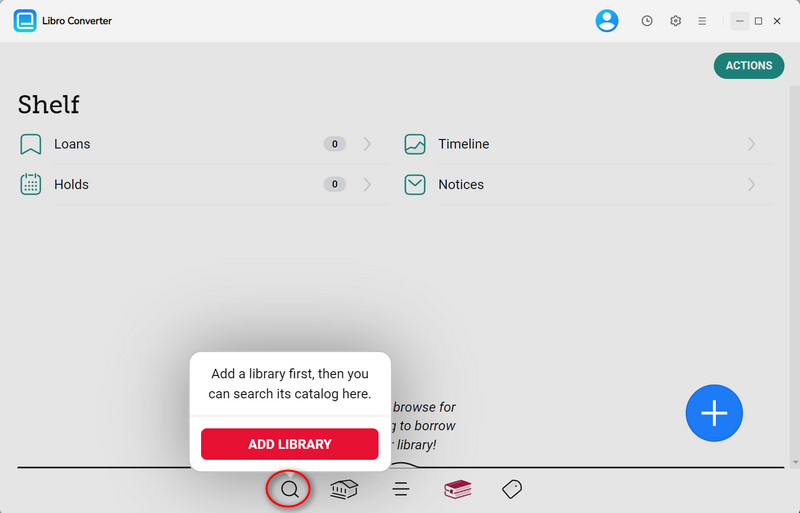
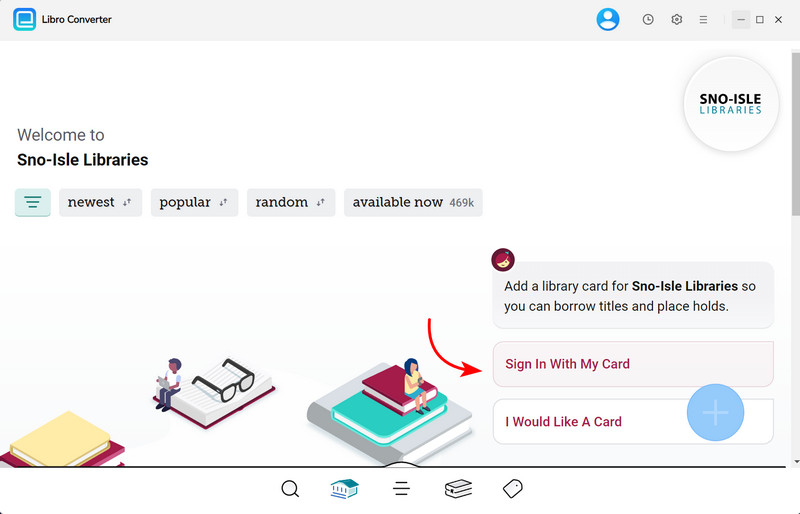
Open AnyLibro Converter and click the Search icon on the interface. Enter your library’s name to locate it, then sign in using your library card credentials. This grants the tool access to your borrowed items.
Step 2. Loan Audiobooks/Ebooks on Libby
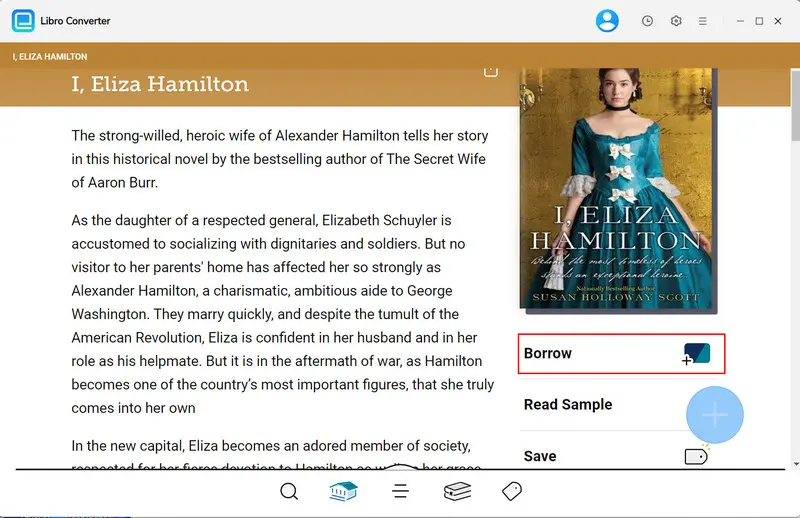
Search for titles within the tool and add them to your borrowing list. If you've reached your loan limit, return existing items to free up space before proceeding.
Step 3. Choose Output Parameters for Libby
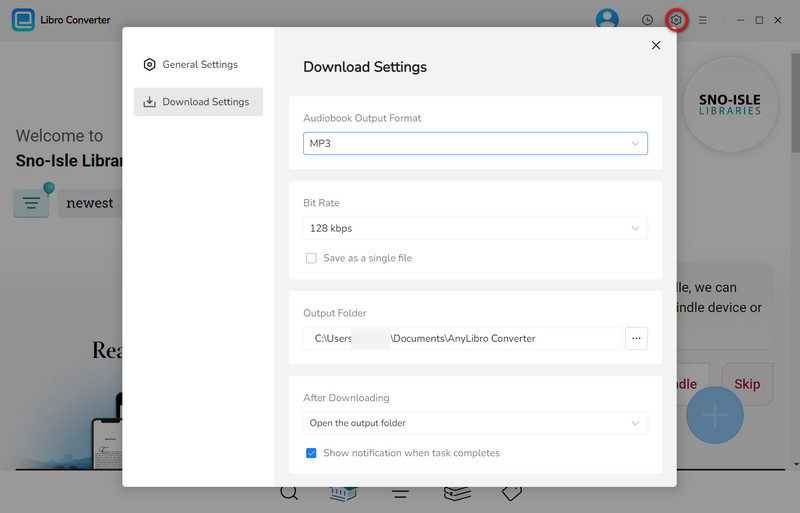
Click the Settings (Gear) icon to configure your preferred output. For eBooks, choose EPUB for broad device compatibility.
Step 4. Convert & Download Libby Audiobooks to MP3
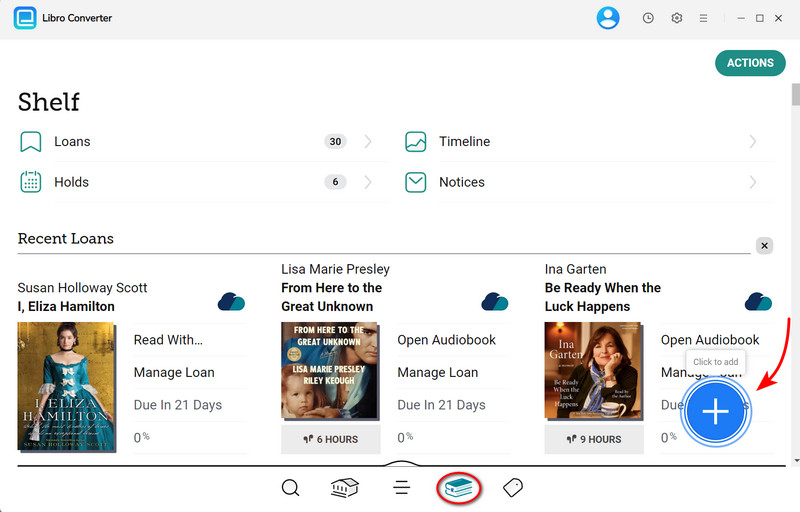
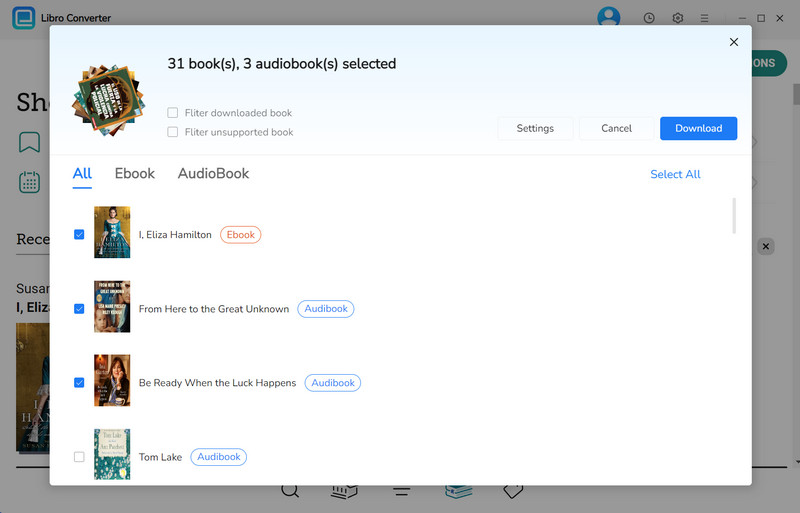
Navigate to your Shelf, click the "+" button, and add titles to your conversion list. Click "Download" to start processing. The tool will convert books to your chosen formats.
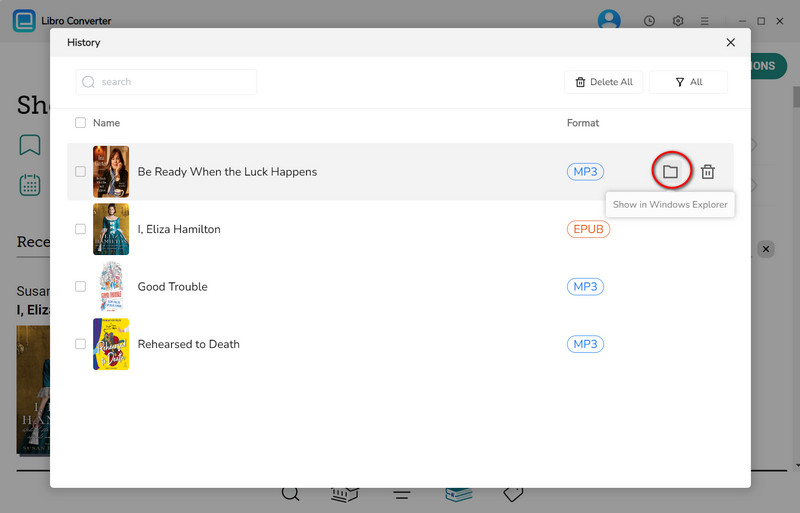
Step 5. Browse Downloaded Libby Audiobooks & ebooks
Once conversion is complete, open the output folder to find your eBooks or audiobooks.
FAQs about Libby APK
Q1: Is the Libby APK safe to download?
A: Yes. Libby APK is an trusted installation file provided by OverDrive. You can feel safe downloading it from the official page. Notably, some third-party websites offer Libby Mod APK files; they may contain suspicious viruses, and you need to access them with caution.
Q2: Is Libby APK free?
A: Yes. The verified Libby APK file will not require payment. What it needs is a working library card.
Q3: Why can't I install the Libby APK?
A: It is advisable to zero in on the root cause and fix it with the corresponding solutions. (Jump to the Troubleshooting part.)
The End
With the detailed guide above, we hope you'll easily install the Libby APK in case that the direct Libby app download is not working. The whole process is straightforward-just grab the official APK installation file, then grant some permission settings on your device. Besides, you should be wary of clicking on the labeled Libby Mod APK file from an unknown website, which may bring about potential risks.
If you're looking to keep Libby books playable forever on any device, then AnyLibro Converter is the best workaround. By outputting Libby titles to MP3, M4A, EPUB, and others via this Libby converter, it's such a breeze to build a permanent, portable library that travels with you anywhere.
Note: During the trial version, you can only convert and save the first 20% of each book. To unlock full access and convert entire books, you’ll need the full version.

Clara Whitman
Clara specializes in creating practical guides for book lovers and digital reading tools.
With years of experience exploring apps like Libby, Kindle, and Audible, she shares clear, step-by-step tips to help readers get the most out of their eBooks and audiobooks.
 Libby Audiobook Converter
 All-In-One Music Converter
 Spotify Music Converter
 Apple Music Converter
 YouTube Music Converter
 Amazon Music Converter
 Tidal Music Converter
 Streaming Music Recorder
 Photo Enhancer AI
 Video Enhancer AI
 Audible Audiobook Converter